Viewing Users
As the Administrator of a Customer account, you can view the users of this account. This function is not visible to user profiles with no administration roles.
Warning: Creating, inviting and managing users is done in ExtremeCloud IQ. Refer to ExtremeCloud IQ documentation.
| 1 | Select the Administration -> Users function from the SD-WAN Orchestrator main menu. The following image shows the number of Users defined for the Customer. You may filter them by Role by clicking any filter button. |
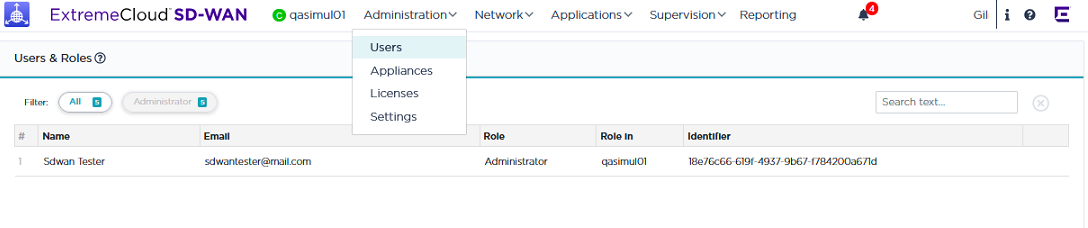
The Search field also enables you to find any User through his other data. Click the  button to delete the Search filters.
When the window contains a significant number of Users, the navigation functions at the bottom of the window enable you to navigate through the list.
| • | By default, one page includes 50 rows. 20 and 100 are the other options. |
| • | The total number of pages is specified. This number changes if you select a different number of rows per page. |
| • | You can display a particular page by directly selecting it from the stack or by clicking the  and and  buttons to move from one page forward and backward. buttons to move from one page forward and backward. |
| • | Click  to view the first page and to view the first page and  to view the last page of the list. to view the last page of the list. |
User Roles
A user is related to one Customer only. In ExtremeCloud IQ, several roles can be defined and assigned to a SD-WAN Orchestrator user.
Each role authorizes access to a specific list of operations in ExtremeCloud SD-WAN. A role determines the CRUD (Create, Read, Update, Delete) rights for each type of entity.
The table below lists the User Role rights for managing the SD-WAN Orchestrator entities.
|
Entity/User Role |
Administrator |
Operator (Domain Manager) |
Monitor & Observer (Viewer) |
|---|---|---|---|
|
Users |
CRUD |
|
R |
|
Appliances |
R |
R |
R |
|
Licenses |
R |
R |
R |
|
Settings |
CRUD |
|
|
|
Applications |
CRUD |
CRUD |
R |
|
Network |
CRUD |
CRUD |
R |
|
Reporting |
R |
R |
R |