
Use the information in this section to determine which APs operate in Low Power (LP) or Standard Power (SP) modes. Some APs operate in both LP and SP modes; these are referred to as composite devices. Guidance on channel selection for 6 GHz radios is also provided here.

Note
AP4020FX does not support LP.Note
The AP5022FX R3 (6 GHz radio) uses an internal antenna when operating in LPI mode and an external antenna when operating in SP mode. In Rest of World (WR) regions, the AP5022FX always operates in LPI mode. In the U.S. and Canada, the AP5022FX operates in either LPI mode or SP with LPI fallback mode. When operating in SP with LPI fallback mode, if spectrum is lost, the external antenna is automatically disconnected, and LPI mode is invoked using the internal antenna.
Note
The AP3020W (indoor) 6 GHz operates in SP mode under the control of the AFC server.
The AP4060/X (indoor/outdoor) 6 GHz radio operates in SP mode.
The AP5020 and AP4020 series (indoor) 6 GHz radio operates in SP mode. Otherwise, with the exception of AP4020FX, they operate in LPI mode.
The AP5050U/D (outdoor) 6 GHz radio operates in SP mode under the control of the AFC server.
The AP5060U/D (indoor/outdoor) 6 GHz radio operates in SP mode under the control of the AFC server. Restricted, indoor AP5060D-WW-LPI, AP5060U-WW-LPI SKUs support 6 GHz SP operation with fallback to LPI operation.
The 6 GHz band supports a large number of channels: LP mode supports UNII-5, 6, 7, and 8, while SP mode supports UNII-5 and 7.
Since numerous channels are offered on the 6 GHz band, the best practice is to configure the Preferred Scanning Channel (PSC) so that the amount of probing is kept to a minimum. Preferred channels function as primary channels at each channel width: 20, 40, 80, 160 MHz, and 320MHz (AP3020W, AP4020/X/FX, AP5020, AP5022/FX/SD6, and AP5060D/U).
20 MHz and 40 MHz only for very for high density deployments
80 MHz default channel width, recommended mainly because the primary channel is automatically set to a PSC channel.
160 MHz and 320 MHz channels to be used only in special circumstance, usually point to point links.
Preferred Scanning Channels (PSC) are highlighted, as shown in LP Channel Select and SP Channel Select.

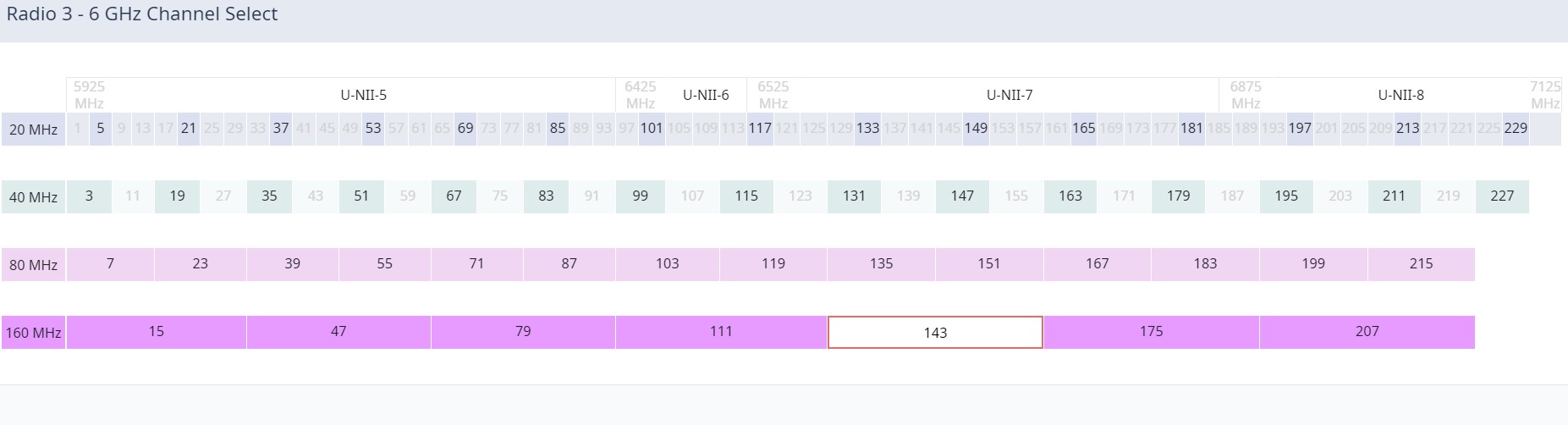

Select Preferred Scanning Channel (PSC) of 20 MHz and 40 MHz channel widths for better performance.
Note
All channels on the 6 GHz band are supported when 20 MHz and 40 MHz are used. It is a best practice to configure Preferred Scanning Channels for faster scanning.Note
6 GHz Wi-Fi Preferred Scanning Channels
Preferred Scanning Channels (PSC) in 6 GHz Wi-Fi are specific channels designated for beacon and discovery purposes. For in-band discovery, clients can only send probe requests on every fourth 20 MHz channel. The complete list of 6 GHz PSC channels is 5, 21, 37, 53, 69, 85, 101, 117, 133, 149, 165, 181, 197, 213, and 229. These channels are spaced every 80 MHz apart, ensuring efficient connectivity and reducing the time spent scanning for an optimal channel.
For the 47e/160 – The center channel is the 160 MHz channel (not bonded) and channel 37 is the associated primary channel.
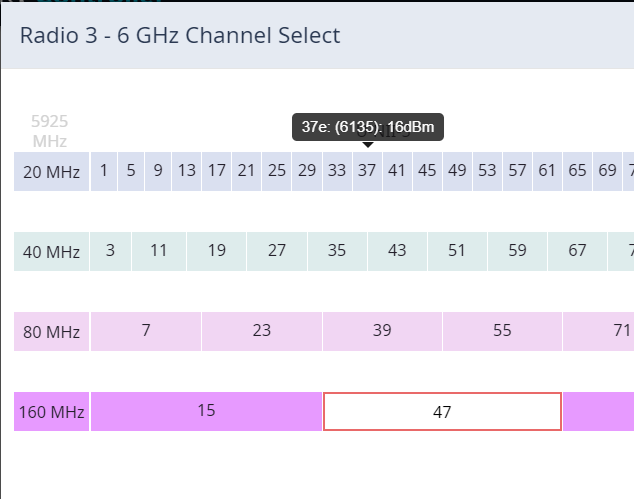
47e/160