
This release improves redundancy and failover support for Tunnel Concentrator deployments that are managed from ExtremeCloud IQ. You can now assign up to three Tunnel Concentrator services as tunnel destination (in Primary, Secondary, and Tertiary roles) for a tunneling-enabled user profile.
This update, when added to existing HA functionality within a Tunnel Concentrator service, provides up to six possible Tunnel Concentrators for tunnel termination within a single User Profile.

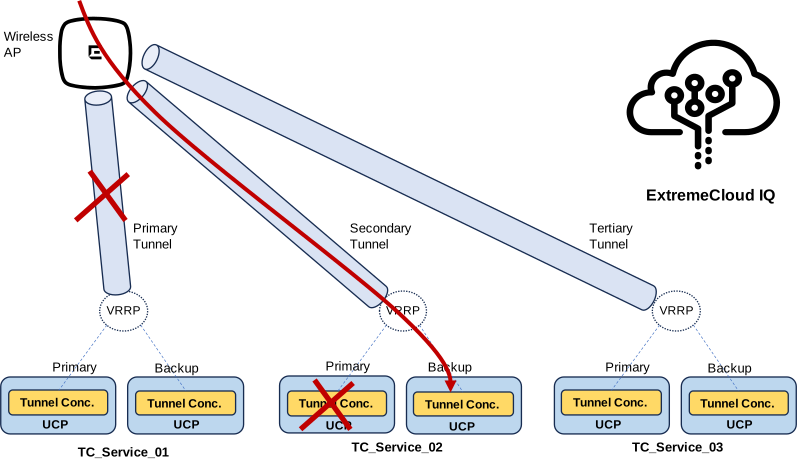
Note the following feature conditions:
You can add geographic redundancy by pointing to Tunnel Concentrator services in geographically dispersed data centers. There is no requirement that the primary, secondary, and tertiary Tunnel Concentrator services within a user profile be on the same network segment, or in the same data center.
A keepalive process is introduced that allows APs to track which tunnels are active and inactive. For each Tunnel Concentrator service, you can configure both the keepalive interval and the number of keepalive retries before an AP deems a non-responsive tunnel to be inactive.
For details, see the ExtremeCloud Tunnel Concentrator Deployment Guide.
You can now obtain the Serial Number for a freshly installed Tunnel Concentrator instance from the engine summary that displays on Universal Compute Platform immediately after you deploy the engine.
For Extreme Cloud IQ-managed deployments, this update removes the requirement to use the Tunnel Concentrator GUI for licensing. You can now obain the serial number from Universal Compute Platform, onboard the unlicensed Tunnel Concentrator instance to ExtremeCloud IQ, and complete licensing and activation from ExtremeCloud IQ.
To do this, follow the existing ExtremeCloud IQ onboarding process to onboard the unlicensed Tunnel Concentrator instance. After onboarding, go to in ExtremeCloud IQ, select the new Tunnel Concentrator instance to open the device Monitoring page for that instance, and then select Appliance UI to launch the embedded user interface. You can then upload the license from the embedded UI to activate the instance.

Note
This update forms Phase 1 of a larger initiative to add the Tunnel Concentrator user interface to ExtremeCloud IQ. Future releases will simplify the process.