Configuring traffic redirection to a Cloud Gateway
The purpose of this Use Case, which is complementary to "Use Case 1", is to enable access to a Cloud Gateway from Branch Office 2 appliance.
Use Case 10
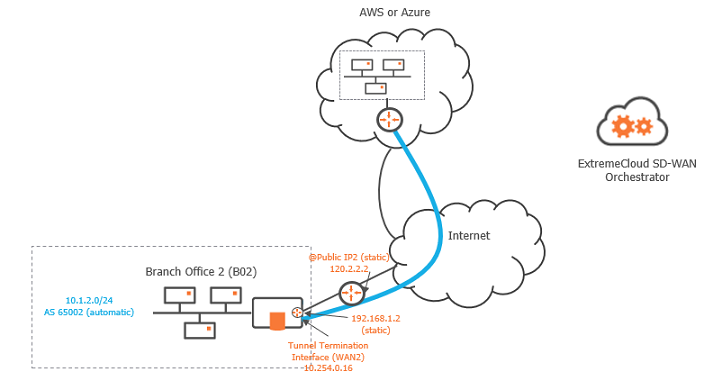
Prerequisites
The following prerequisites describes the necessary configuration actions in AWS and Azure for the Cloud gateways the SD-WAN Orchestrator will connect to.
AWS
|
•
|
Your administrator should create an IAM user with programmatic access on the AWS account. Both Access Key ID and Secret Access Key values needed to create a Cloud Access object in the SD-WAN Orchestrator are generated when you create an IAM user in AWS. |
|
•
|
The required IAM policy describes the programmatic access set of permissions, i.e. the actions the SD-WAN Orchestrator can execute: |

|
•
|
The two types of AWS managed gateways, i.e. Virtual Private Gateways and Transit Gateways are supported and must be configured with dynamic routing (BGP activated). |
|
•
|
The AS number is unique for each AWS gateway and should not conflict with the AS number range used for the SD-WAN overlay. |
|
•
|
Routing between VPCs and gateways is managed by you. |
Azure
|
•
|
The role to be associated with the application on the targeted subscription is 'Network Contributor'. |
|
•
|
A Storage Account is necessary for storing the configuration information of the VPN tunnels. Any type of storage account is authorized except 'FileStorage'. Access to the storage account is done through a 'full permission' access key. |
|
•
|
vnet gateways of type VPN and virtual hubs with an instantiated VPN gateway are supported. |
|
•
|
vnet gateways must be route-based with BGP enabled. |
|
•
|
The AS number is unique for each vnet gateway and should not conflict with the AS number range used for the SD-WAN overlay. |
Procedure
|
3
|
Connect the selected Branch Office appliance to the Cloud Gateway: |
|
4
|
Configure cloud connection parameters. |
Depending on the gateway, two tunnels are created after you have defined the appropriate parameters in both the Orchestrator and in AWS or Azure.