Configuring traffic redirection to EdgeSentry
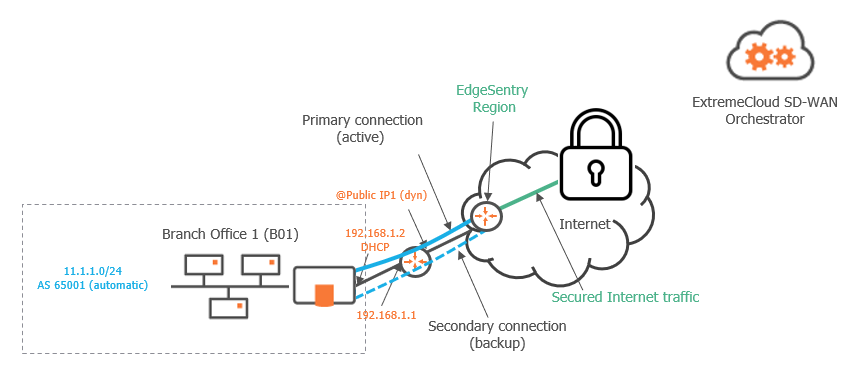
The purpose of this Use Case, which is complementary to "Use Case 1", is to provide a Branch Office with Cloud advanced security of its Internet traffic.
EdgeSentry which is ExtremeCloud SD-WAN's Cloud Security feature, is delivered from the Cloud through Check Point, a renowned Security Vendor. It offers the following services:
| • | Access Control, i.e. access rules define which Internet traffic is allowed or blocked |
| • | Threat Prevention that includes a set of mechanisms like Intrusion Prevention System (IPS), anti-virus, anti-bot and sandboxing |
| • | HTTPs Inspection with basic and full inspection levels |
| • | Logs, events, dashboards and weekly reports on the Internet traffic |
This section describes how to configure EdgeSentry in your network, from Branch Office 1 appliance over the Internet.
Two tunnels are created per WAN Router interface after you have defined the appropriate parameters in the SD-WAN Orchestrator.
Prerequisites
You can use the EdgeSentry feature of the SD-WAN Orchestrator if:
| • | you have purchased two licenses: Ent-Branch-* or Ent-DC-* for the appliance, and Ent-EdgeSentry-10 for the domain. Refer to "Viewing Licenses" |
| • | Extreme Networks has activated EdgeSentry for your Customer account |
Graph legend
|
|
|
|
|
|
Blue connection |
Grey connection |
|
SD-WAN appliance |
router |
subnet |
host in a subnet |
server |
IPsec tunnel |
physical connection between devices |




Note: A router may be a CE Router (MPLS Router), an Internet Access Router or a Core Router.