Add Nodes

Use this procedure to add new nodes to an existing multi-node cluster.
Note

Note

  • A multi-node cluster must be a multiple of three nodes. For example, clusters of 3, 6, and 9 nodes are acceptable. As a result, the minimum number of new nodes that you can add is three.
  • The Add Nodes feature is not available for standalone cluster deployments.
  • If you want to replace a single node that's failed, use the Replace a Node procedure.
  1. Configure and install the new nodes so that they can be added to the cluster. For each new node, do the following steps. For procedures, see ExtremeCloud Edge - Managed Orchestration Deployment Guide.
    1. Connect to the new node using the Console port.
    2. Run the Basic Configuration Wizard on the new node and assign network settings such as ICC IP addresses, data port IP addresses, DNS, and NTP servers.
    3. Upgrade the software version on the new node so that the new node is running the same version as the rest of the cluster.
    4. Configure VRRP on the new node to match VRRP settings from the existing nodes.
    5. Install the new node on the network so that the node is powered on and has network connectivity to the rest of the cluster. For help, see the Installation Guide for your appliance model.
    6. Repeat these substeps for each new node.
  2. Update the cluster configuration to include the new nodes. On the primary cluster node, do the following:
    1. Go to Cluster Settings > Add Node.
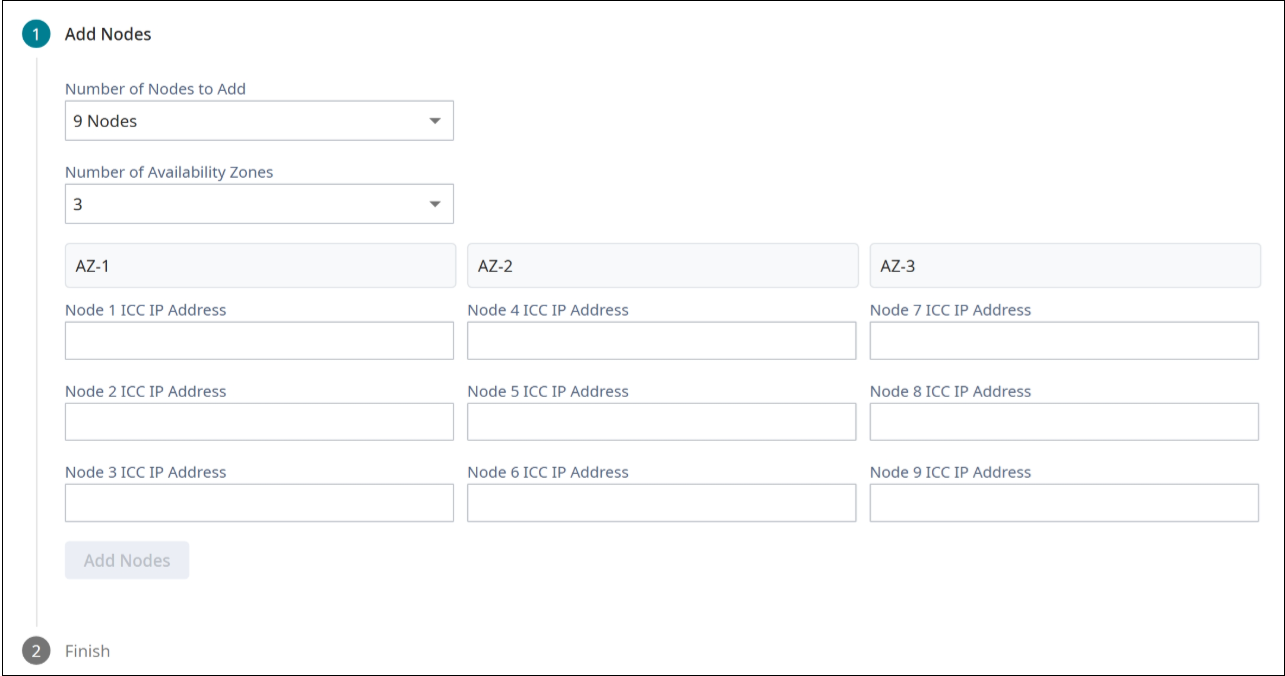
    2. In the Number of Nodes to Add drop-down, select the number of nodes that you are adding.
    3. From the Number of Availability Zones drop-down, select the number of availability zones to which you are adding nodes.
      Note

      Note

      This setting appears only if the existing cluster has multiple availability zones configured.
      Note

      Note

      Keep the following points in mind when adding new nodes to a cluster that is split into multiple availability zones:
      • Each availability zone must have the same number of nodes per zone with a minimum of three nodes per zone.
      • If the existing cluster has three zones, you must add nodes in multiples of three.
      • If the existing cluster has two zones, you must add nodes in multiples of six.
      • You cannot reconfigure the number of availability zones in an existing cluster. The cluster must have the same number of zones before and after the node additions.

      For more information, see Availability Zones.

      Click to expand in new window
      Add Nodes with Multiple Availability Zones
    4. Enter the ICC IP Address for each new node and then select Add Nodes.
    5. Select OK.