
You can solve common, temporary issues by performing a reboot or factory reset on the AP. It is important to know the difference between the two before you perform a reset or reboot.
See LED Descriptions for an explanation of LED display.
The Reset button is located next to the Console port.

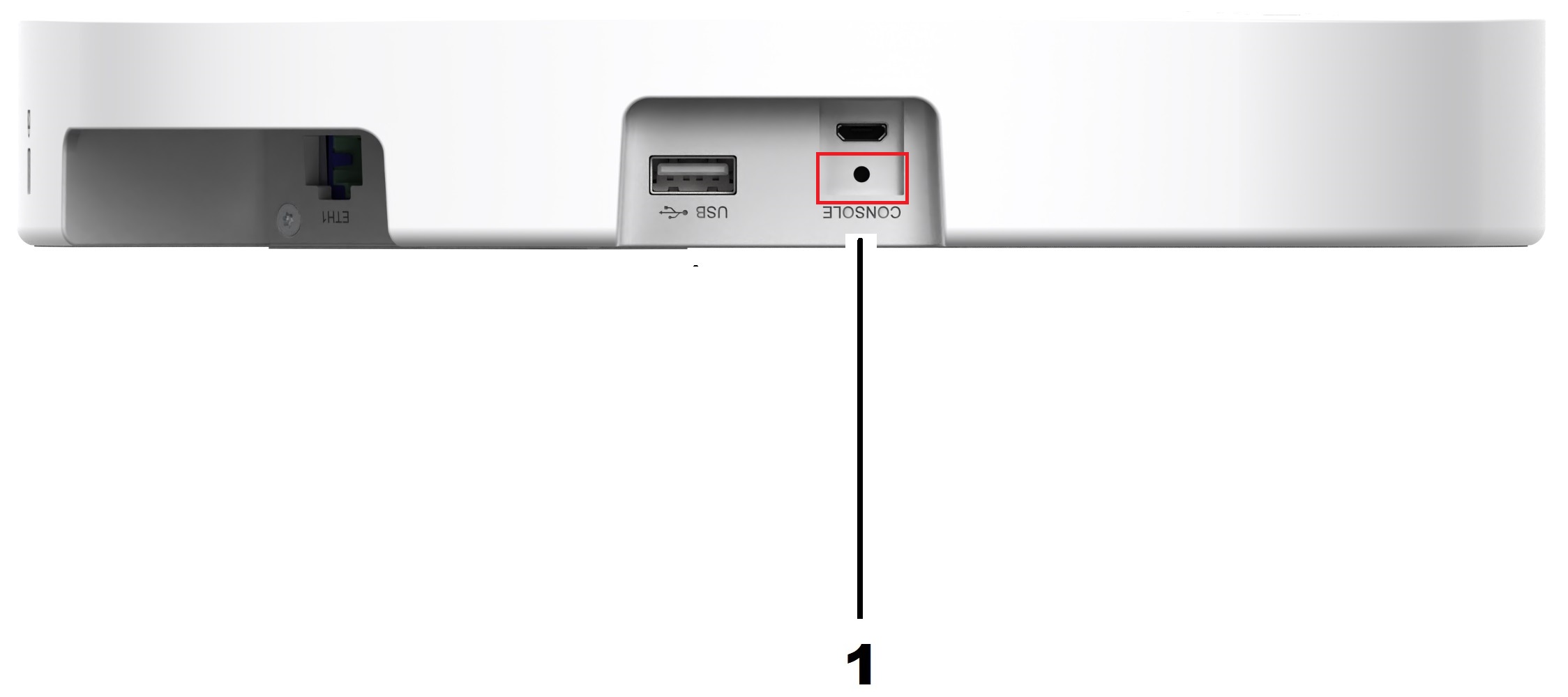
| Item | Port | Description |
|---|---|---|
| 1 | Reset | Used to reboot the AP or do a factory reset. |
A reboot - also called a power cycle - deletes the logs, but preserves all of the configuration settings. It also applies firmware upgrades and is often done to clear minor issues such as software issues or if the AP is not responding.
There are two ways to reboot the AP:
With a hardware reboot - either by disconnecting the power adapter or the PoE cable, or by pressing and immediately releasing the Reset button.

Important
When you perform a hardware reboot, press and release the Reset button. Do not hold the Reset button. If you hold the Reset button then you will start a Factory Reset.With ExtremeCloud IQ Controller and ExtremeCloud IQ. See ExtremeCloud IQ Controller User Guide or ExtremeCloud IQ User Guide. This is often done after installation or if the AP cannot be easily accessed.
A factory reset deletes your configuration settings and restores the AP to the original factory settings.

Note
A factory reset should only be done if you intend to restore AP to the original factory configurations.With a hardware reset - press and hold the Reset button for at least 10 seconds.
With ExtremeCloud IQ Controller and ExtremeCloud IQ. See ExtremeCloud IQ Controller User Guide or ExtremeCloud IQ User Guide.