Before you configure the Server Certificate, you must Manage CA Trusted Root Certificates in Universal ZTNA.
Before a Server Certificate can be requested, a Certificate Signing Request (CSR)
needs to be generated on behalf of Universal ZTNA to be signed by the
Certificate Authority or Intermediate Certificate Authority.
Use this task to create a SAN configuration file, and execute a command against that
file to create a new certificate file as well as a new private key file with no
password.
- Access any Linux environment with OpenSSL installed using SSH.
- After accessing the machine,
generate a key file using the following comment.
openssl genrsa -out
                        serverkey.pem 2048
- Use vi, vim, or another editor
to create a file named san.cnf.
- Edit the file and then copy in
the text below.
[ req ]
default_bits = 2048
prompt = no
default_md = sha256
distinguished_name = dn
req_extensions = req_ext
[ dn ]
CN = radius.va2-uz.extremecloudiq
emailAddress = remote_demo@extremenetworks.com
O = Extreme Networks
OU = Solutions Engineering
L = Salem
ST = New Hampshire
C = US
[ req_ext ]
subjectAltName = @alt_names
[ alt_names ]
DNS.1=radius.va2-uz.extremecloudiq.com

Note
The "CN" field is mandatory.
- Save the file and then run the
following command:
openssl req -new -key
                        -serverkey.pem -out va2-uz-server.csr -config san.cnf
This command will create
a .csr file to be used to
create a new server certificate to be used along with the serverkey.pem file to
update the server certificate in Universal ZTNA.
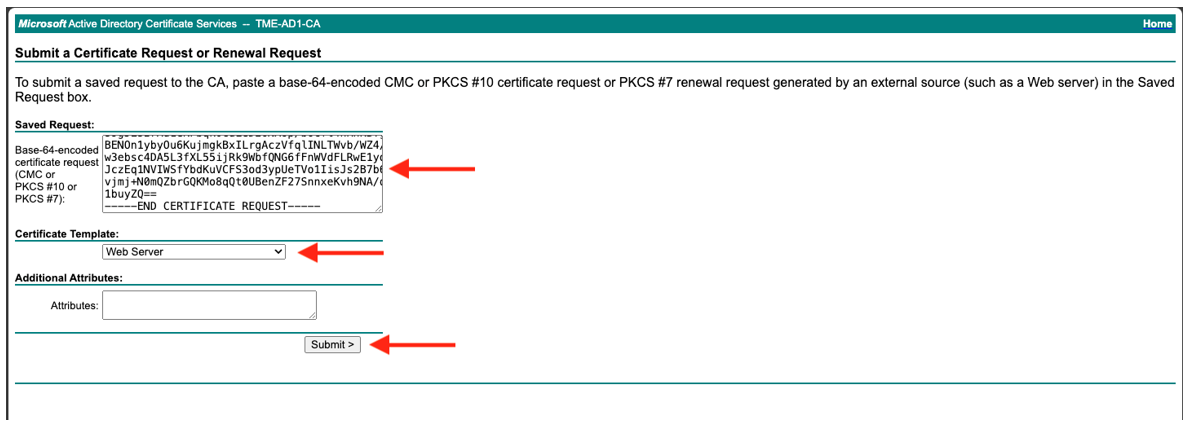
- Go back to Microsoft Active
Directory Certificate Services: https://<domain name>/certsrv.
- Select Request a
Certificate and advanced certificate
request.
- Copy the contents of the CSR
file and paste it into the Save Request
field.
- Select Web Server from
the template drop-down and select Submit.
- Once complete, select Base 64 encoded
and Download
Certificate.
- The certificate request can also
be made using powershell by issuing the following command:
certreq -submit -attrib
                        “CertificateTemplate: WebServer” va2-uz-server.csr
- Go to Universal ZTNA, select .
Note
Note: If an intermediate certificate authority issues the certificate, the intermediate CA certificate needs to be bundled with the server certificate. In a text editor the files can be added sequentially.
- Within the Server & Intermediate
Certificates section, select
 and select Update Certificate.
Note
Both certificate and key
files must be renamed using a
.pem
extension before being uploaded.
- Select Certificate with Embedded
Key or Certificate with Separate Key.
- To upload the newly created
certificate as well as the key file drag and drop or browse for the file.
- Select Update.
Validation of the
certificate is instantaneous. Certificate deployment to freeradius will take upwards of two minutes to complete. Once this is
accomplished, clients should be able to connect using 802.1X
EAP-TLS.
- To invalidate RADIUS server
certificates, select and select Invalidate Certificate from the drop-down menu.