

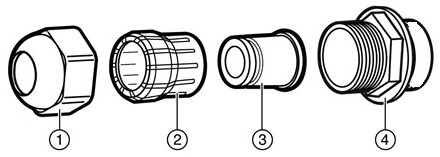
Use the following information to select a gland LAN cable gasket:
The RJ45 plug must not extend more than 40 mm (1.57 in.) from the end of the LAN cable jacket.
Use the gray colored Gland LAN gasket included in the as shipped product's gland for all CAT5 and CAT5E LAN cables.
Also use the gray colored Gland LAN gasket included in the as shipped product's gland for CAT6, without shielding, LAN cables.
Use the black colored Gland LAN gasket for CAT6, with shielding, and all CAT6A LAN cables and reuse the Gland cage (item 2 in the table below). You can order ten black gaskets as accessory ACC-ODS-CAT6A-LAN-GSKT.
| Callout | Item |
|---|---|
| 1. | Gland cap. |
| 2. | Gland cage. |
| 3. | Gland LAN cable gasket. |
| 4. | Gland body - Do not remove the gland body. This is a factory sealed component; do not remove from housing. |