
ETH0: 100/1GE/2.5GE Mbps auto-sensing Ethernet PoE port with PoE in.
802.3az Energy-Efficient Ethernet (EEE).

Important
South Korea, Mexico, Taiwan, and Brazil require the use of CAT6 shielded cable.
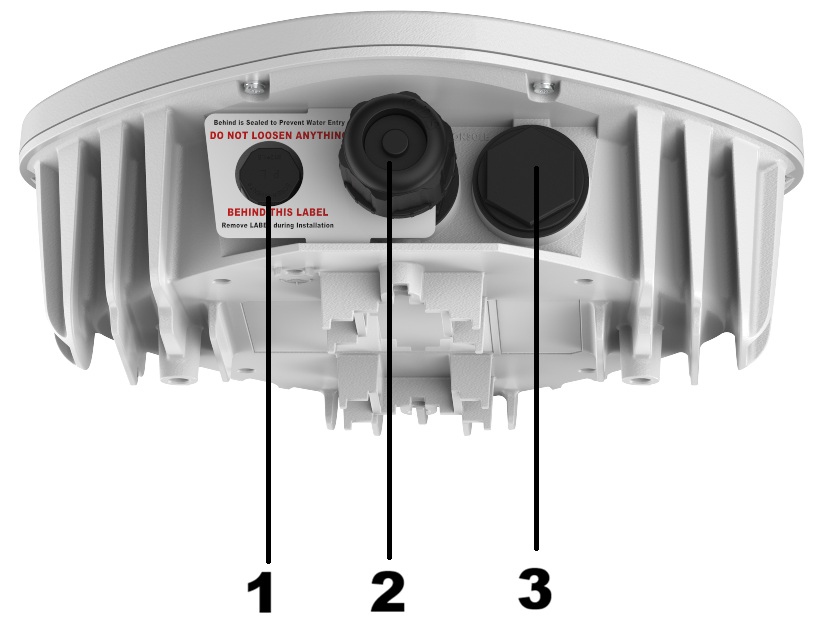
| Item | Port | Description |
|---|---|---|
| 1 | Air Vent | A pressure valve for the release of air. Do not loosen this vent. |
| 2 | ETH0/PoE | Ethernet port. |
| 3 | Console port | Micro USB console port for a serial connection between your management system and the access point. Use the port when you troubleshoot the AP. Tip: The best practice is to use the Extreme Networks micro USB cable (ACC-WIFI-MICRO-USB). When you connect to the device, the management station must have a VT100 emulation program, such as the terminal emulator TeraTerm Pro or Hilgraeve HyperTerminal. Set the baud rate to 115200.
Note: The console port can only be used with the Extreme Networks console cable. You could damage the AP if you use another cable.
|