
To manage devices, the DHCP server and the FTP server must be set up to provide the environment.

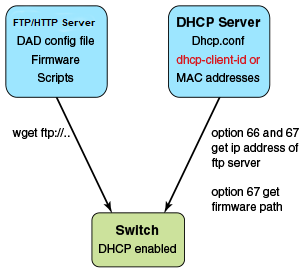
DHCP Server version 4.2.4 was tested on Ubuntu 14.04 (Trusty). The dhcpd.conf file must have option 66 (TFTP Server Name) and option 67 (Filename) set for ZTP. Option 66 is used for the FTP server IP address or host name. Option 67 is used for the ZTP configuration file path.
When the device starts the DHCP process, it sends the DHCP client ID to the DHCP server to get the IP address and options 66/67. The device then downloads the ZTP configuration file from the FTP server. To set up a different ZTP configuration file for different devices, the DHCP Client ID can be used in the dhcpd.conf file. Whenever dhcpd.conf is changed, the dhcpd server must be restarted.
Option 43 is used to share the URL for the HTTPS server's CA certificate so that clients can use HTTPS to securely connect to. This URL is HEX encoded.
vsFTP server version 3.0.2 was installed and tested on Ubuntu 14.04 (Trusty). The FTP server stores the ZTP configuration file, firmware, switch configuration file, or Python script. The location of these configuration files under the FTP server base directory is flexible.
Apache server version 2.4.18 was installed and tested on Ubuntu 14.04 (Trusty). The HTTP/HTTPS server stores the ZTP configuration file, firmware, switch configuration file, or Python script. The location of these configuration files under the HTTP/HTTPS server's base directory is flexible.
The ZTP process can run the script to set up the device configuration automatically. At present, only the Python script is supported. The script takes no parameters.
The script can automate any command line, including SLX-OS and Linux commands, such as the configuration download command, copy ftp:// . . . running-config.
The ZTP configuration file has two configuration sections: common and device-specific. The settings in the common section is shared by all the switches in the IP Fabric. The settings in the device-specific section can be used for a single switch or a group of switches with the DHCP client ID. If the host_client_id string matches the starting substring of the DHCP client ID of the switch, the device-specific section is used by the switch.
The following is an example Python script.
# !/usr/local/python/3.3.2/bin/python3
import os
import sys, getopt

def main(argv):
      log.write("apply config\n")
# change login banner
      CLI(“conf ; banner login DAD ; end”)
# config download
      CLI(“copy scp://root:extr123@192.169.0.2/castorT.startup.cfg running-config”)
if __name__ == "__main__":
   main(sys.argv[1:])
The following is an example FTP server configuration file.
local_enable=YES
write_enable=YES
local_umask=022
dirmessage_enable=YES
xferlog_enable=YES
connect_from_port_20=YES
xferlog_std_format=YES
listen=NO
listen_ipv6=YES

pam_service_name=vsftpd
userlist_enable=NO
tcp_wrappers=YES

# dad settings
anonymous_enable=YES
no_anon_password=YES
anon_root=/var/ftp
delay_failed_login=30
max_clients=100
anon_max_rate=8388608
The following is an example DHCP server configuration file, dhcp.conf
# ddns-update-style standard;
ddns-update-style interim;
ddns-ttl 600;
ignore client-updates; # Overwrite client configured FQHNs
ddns-domainname "infralab.com.";
ddns-rev-domainname "in-addr.arpa.";

option ntp-servers 192.168.0.2;
option domain-name-servers 192.168.0.2;
option domain-name "infralab.com";
option domain-search "infralab.com";

default-lease-time 600;
max-lease-time 7200;

authoritative;

log-facility local7;

key "extr-key" {
	algorithm hmac-md5;
	secret "dtBgNTAoqZmwV5c4SueybjOvhe6OIqgac1uQrzGBv5O4X4nIEBEEGWRf0lCnbFhuIJXGExNBjDdNSqgBMeNI8w==";
};

subnet 192.168.0.0 netmask 255.255.255.0 {
  range 192.168.0.100 192.168.0.200;
  option subnet-mask 255.255.255.0;
  option broadcast-address 192.168.0.255;
  option tftp-server-name "192.168.0.1";
  option bootfile-name "/config/ztp.cfg";
  option vendor-encapsulated-options 68:74:74:70:73:3a:2f:2f:35:2e:35:2e:35:2e:31:3a:34:34:33:2f:73:65:72:76:65:72:2e:63:72:74;
  zone 0.168.192.in-addr.arpa. {
        primary 192.168.0.2;
        key "extr-key";
  }
  zone infralab.com. {
        primary 192.168.0.2;
        key "extr-key";
  }
}
# cluster switches
group{
  option bootfile-name "/config/unified-cfg.min";
  option tftp-server-name "192.168.0.2";
  option routers 192.168.0.2;

  # sw0
  host sw0 {
	option dhcp-client-identifier = "EXTREMENETWORKS##SLX9240##EXG3342L00V";
	hardware ethernet 52:54:00:0E:95:8B;
	fixed-address 192.168.0.90;
# fixed ip address
The following example has three sections: common, switch 1, and switch 2.
version=3
date=03/20/2018
supported_nos=17s.1.03

  common_begin
  vcsmode=SA
  scriptcfgflag=2 #0-config file only, 1-script only, 2 both
  script=/script/ztp.py
  fwdir=/fw/slxos17s.1.03_bld04
  common_end

  # model SLXL9140 hosts
  host_client_id=EXTREMENETWORKS##SLX9140
  script=/script/Frreddomlic.py
  startup=/config/freedomlic.cfg
  host_end

  # model SLX9140 with serial number
  host_client_id=EXTREMENETWORKS##SLX9140##EXH3327M014
  startup=/config/freedom_ospf.cfg
  script=/script/FreedomZTP.py
  host_end

  # model Accton hosts with serial number
  host_client_id=EXTREMENETWORKS##ModelNumber##SerialNumber
  startup=/config/AcctonConfig.cfg
  script=/script/AcctonZTP.py
  host_end
The following table contains the ZTP configuration file definitions.
| Variable description | Description |
|---|---|
| version | Only version 3 is supported. |
| date | The last modified date. |
| supported_nos | The release firmware version supporting the ZTP configuration file. |
| host_client_id, host_end |
Host_client_id marks the beginning of the section host_end marks the end. User could set up the switch specific section with full dhcp client id or its prefix. Ex. host_client_id=EXTREMENETWORKS##SLX9140##EXH3319M01J script=/script/dad1new.py host_end |
| common_begin, common_end | The setting in the section will be shared by all switches. |
| vcsmode=SA | Only standalone mode is supported. |
| vcstimeout |
If omitted, the default is 60 minutes. The timeout to wait for ZTP to complete configuration file download or Python script. If the configuration download process or Python script has issues, the zero touch provisioning process will stop the download after timeout and claim that ZTP is complete. You will need to increase the timeout if configuration download or Python script takes a long time to complete. |
| fwdir | Firmware path in the FTP/HTTP server. For example Fwdir=/fw/ slxoss17r.1.00_bld34. If base directory of the server is /var/ftp, then the absolute path of firmware in ftp server is located at /var/ftp/fw/slxoss174.1.00_bld34. |
| startup | The path to the switch configuration file in the FTP server. If omitted, the switch will take the default configuration. The value can be "default" or user configuration file. |
| scriptcfgflag |
The default is 0, when not specified. The meaning of the value is: 0 - only use startup, script is ignored 1 - only use script, startup is ignored |
| script | The device configuration Python script file. |
ZTP has two commands, dhcp ztp log and dhcp ztp cancel. These are illustrated below.
device# dhcp ztp log
ZTP, Thu Apr 10 12:48:51 2025, ========== ZTP start ==========
ZTP, Thu Apr 10 12:48:51 2025, disable raslog
ZTP, Thu Apr 10 12:48:51 2025, CLI is ready
ZTP, Thu Apr 10 12:49:19 2025, inband ports are enabled
ZTP, Thu Apr 10 12:49:19 2025, serial number = 771232X1750017
ZTP, Thu Apr 10 12:49:19 2025, model name = AS7712-32X
ZTP, Thu Apr 10 12:49:19 2025, use both management inteface and inband interfaces
ZTP, Thu Apr 10 12:49:19 2025, checking inband interfaces link status
ZTP, Thu Apr 10 12:49:19 2025, find link up on intefaces: eth0
ZTP, Thu Apr 10 12:49:19 2025, start dhcp process on interfaces: eth0
ZTP, Thu Apr 10 12:49:20 2025, interface eth0 receives dhcp response
ZTP, Thu Apr 10 12:49:20 2025, ping server 192.169.0.1
ZTP, Thu Apr 10 12:49:21 2025, ping succeed
ZTP, Thu Apr 10 12:49:21 2025, download ZTP config file from https://192.169.0.1/config/ztp.conf
ZTP, Thu Apr 10 12:49:21 2025, download ZTP config file from http://192.169.0.1/config/ztp.conf
ZTP, Thu Apr 10 12:49:21 2025, receive ZTP configuration file [ztp.conf]
ZTP, Thu Apr 10 12:49:21 2025, interface eth0 connectivity test pass
ZTP, Thu Apr 10 12:49:21 2025, download switch config file [startup.cfg]
ZTP, Thu Apr 10 12:49:21 2025, ZTP configuration sanity check pass
ZTP, Thu Apr 10 12:49:22 2025, skip firmware upgrade
ZTP, Thu Apr 10 12:49:38 2025, replay config file...
ZTP, Thu Apr 10 12:50:25 2025, commit configuration
ZTP, Thu Apr 10 12:50:25 2025, ZTP succeed
ZTP, Thu Apr 10 12:50:25 2025, enable raslog
ZTP, Thu Apr 10 12:50:25 2025, ========== ZTP completed ==========

device# dhcp ztp cancel
Warning: This command will terminate the existing ZTP session
Do you want to continue? [y/n] y
The following displays current ZTP progress for HTTPS.
device# dhcp ztp log
ZTP, Thu Apr 10 13:53:15 2025, ========== ZTP start ==========
ZTP, Thu Apr 10 13:53:15 2025, disable raslog
ZTP, Thu Apr 10 13:53:15 2025, CLI is ready
ZTP, Thu Apr 10 13:53:31 2025, inband ports are enabled
ZTP, Thu Apr 10 13:53:31 2025, serial number = 1927Q-20908
ZTP, Thu Apr 10 13:53:31 2025, model name = SLX9150-48XT
ZTP, Thu Apr 10 13:53:31 2025, use both management interface and inband interfaces
ZTP, Thu Apr 10 13:53:32 2025, checking inband interfaces link status
ZTP, Thu Apr 10 13:53:32 2025, find link up on interfaces: eth0
ZTP, Thu Apr 10 13:53:32 2025, start dhcp process on interfaces: eth0
ZTP, Thu Apr 10 13:53:42 2025, retry in 10 seconds
ZTP, Thu Apr 10 13:53:52 2025, inband ports are enabled
ZTP, Thu Apr 10 13:53:52 2025, serial number = 1927Q-20908
ZTP, Thu Apr 10 13:53:52 2025, model name = SLX9150-48XT
ZTP, Thu Apr 10 13:53:52 2025, use both management interface and inband interfaces
ZTP, Thu Apr 10 13:53:52 2025, checking inband interfaces link status
ZTP, Thu Apr 10 13:54:44 2025, find link up on interfaces: eth0 Eth0.23
ZTP, Thu Apr 10 13:54:44 2025, start dhcp process on interfaces: eth0 Eth0.23
ZTP, Thu Apr 10 13:54:46 2025, interface Eth0.23 receives dhcp response
ZTP, Thu Apr 10 13:54:48 2025, config ip address 5.5.5.12/24 on interface Eth0.23
ZTP, Thu Apr 10 13:54:55 2025, ping server 5.5.5.1
ZTP, Thu Apr 10 13:54:56 2025, ping succeed
Downloaded through wget command https://5.5.5.1:443/server.crt
Downloaded through wget command yes server.crt.
Downloaded server.crt to /etc/ssl/certs.
ZTP, Thu Apr 10 13:54:56 2025, download ZTP config file from https://5.5.5.1/config/ztp.cfg
ZTP, Thu Apr 10 13:54:56 2025, receive ZTP configuration file [ztp.cfg]
ZTP, Thu Apr 10 13:54:56 2025, interface Eth0.23 connectivity test pass
ZTP, Thu Apr 10 13:54:59 2025, firmware upgrade sanity check passed
ZTP, Thu Apr 10 13:54:59 2025, ZTP configuration sanity check pass
ZTP, Thu Apr 10 13:54:59 2025, start firmware upgrade...
ZTP, Thu Apr 10 14:03:51 2025, ========== ZTP continue ==========
ZTP, Thu Apr 10 14:03:51 2025, disable raslog
ZTP, Thu Apr 10 14:03:51 2025, CLI is ready
ZTP, Thu Apr 10 14:03:52 2025, start firmware commit
ZTP, Thu Apr 10 14:05:22 2025, firmware upgrade succeed.
ZTP, Thu Apr 10 14:05:47 2025, commit configuration
ZTP, Thu Apr 10 14:05:47 2025, ZTP succeed
ZTP, Thu Apr 10 14:05:47 2025, enable raslog
ZTP, Thu Apr 10 14:05:47 2025, ========== ZTP completed ==========

device#
The following action cancels the current ZTP session.

Note
Before making any configuration changes from the CLI, the user must reboot the switch to return to the default configuration. A reboot abandons all switch configuration set by ZTP.device# dhcp ztp cancel Warning: This command will terminate the existing ZTP session Do you want to continue? [y/n] y