
The QSFP-DD port status tri-colored (RGB) LEDs are located to the right of each port, as shown in . The LEDs indicate a link to the port, the rate that is configured for the port, and active traffic on the port. The LEDs can also indicate fault conditions.

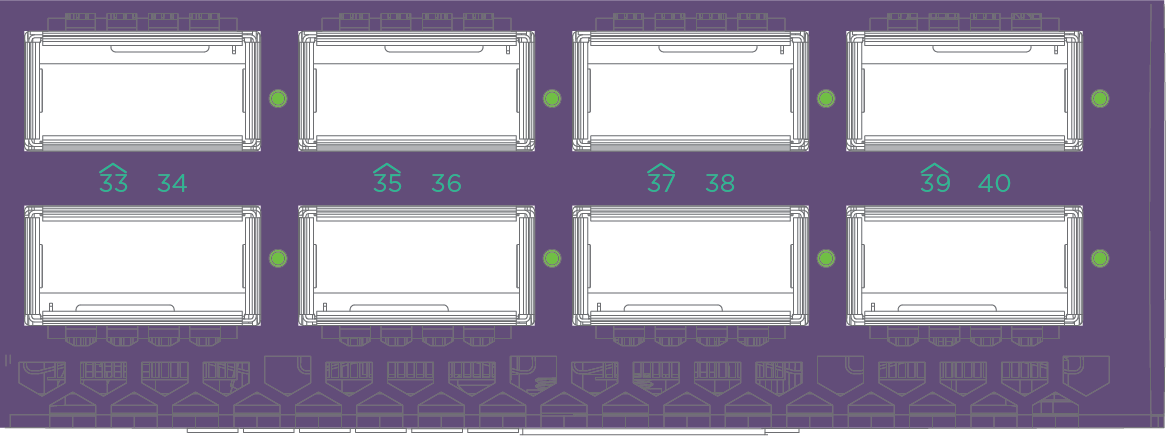
The meaning of the colors and states for the QSFP-DD port LEDs are described in QSFP-DD Port Status LEDs.
| State | Description | Red | Green | Blue | Blink |
|---|---|---|---|---|---|
| Solid cyan | Link at 400Gbps | 0 | 1 | 1 | 0 |
| Fast blinking cyan | Activity at 400Gbps | 0 | 1 | 1 | 1 |
| Solid magenta | Link at 200Gbps | 1 | 0 | 1 | 0 |
| Fast blinking magenta | Activity at 200Gbps | 1 | 0 | 1 | 1 |
| Solid white | Link at 100Gbps | 1 | 1 | 1 | - |
| Fast blinking white | Activity at 100Gbps | 1 | 1 | 1 | 1 |
| Solid yellow | Link at 50Gbps | 1 | 1 | 0 | 0 |
| Fast blinking yellow | Activity at 50Gbps | 1 | 1 | 0 | 1 |
| Solid blue | Link at 40Gbps | 0 | 0 | 1 | 0 |
| Fast blinking blue | Activity at 40Gbps | 0 | 0 | 1 | 1 |
| Solid green | Link at 25Gbps or 10Gbps | 0 | 1 | 0 | 0 |
| Fast blinking green | Activity at 25Gbps or 10Gbps | 0 | 1 | 0 | 1 |
| Solid red | Local fault Detected. | 1 | 0 | 0 | 0 |
| Blinking red | Remote fault detected. | 1 | 0 | 0 | 1 |
| Off | No link or fault. Port is either administratively disabled or enabled but no transceiver is installed | 0 | 0 | 0 | 0 |
The QSFP28 port status tri-colored (RGB) LEDs are located below the port for odd numbered ports and above the port for even numbered ports.
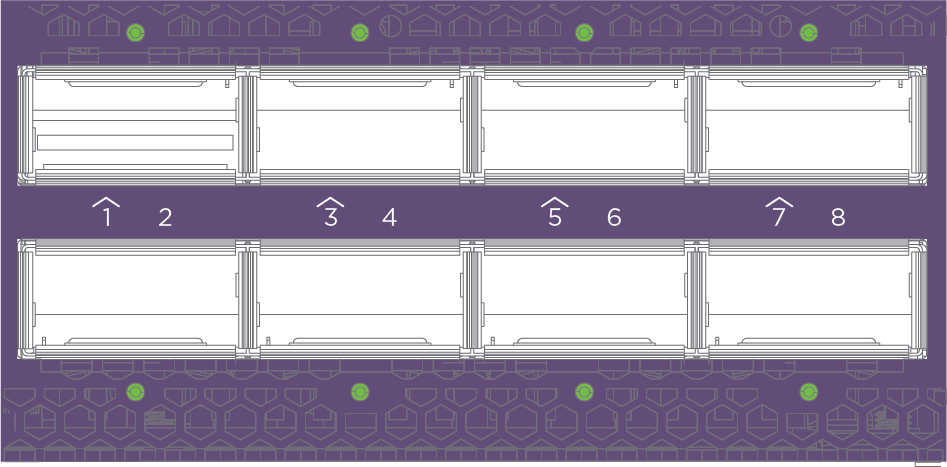
The meaning of the colors and states for the QSFP28 port LEDs are described in QSFP28 Port Status LEDs.
| State | Description | Red | Green | Blue | Blink |
|---|---|---|---|---|---|
| Solid cyan | Link at 400Gbps | 0 | 1 | 1 | 0 |
| Fast blinking cyan | Activity at 400Gbps | 0 | 1 | 1 | 1 |
| Solid white | Link at 100Gbps | 1 | 1 | 1 | - |
| Fast blinking white | Activity at 100Gbps | 1 | 1 | 1 | 1 |
| Solid yellow | Link at 50Gbps | 1 | 1 | 0 | 0 |
| Fast blinking yellow | Activity at 50Gbps | 1 | 1 | 0 | 1 |
| Solid blue | Link at 40Gbps | 0 | 0 | 1 | 0 |
| Fast blinking blue | Activity at 40Gbps | 0 | 0 | 1 | 1 |
| Solid green | Link at 25Gbps or 10Gbps | 0 | 1 | 0 | 0 |
| Fast blinking green | Activity at 25Gbps or 10Gbps | 0 | 1 | 0 | 1 |
| Solid red | Local fault Detected. | 1 | 0 | 0 | 0 |
| Blinking red | Remote fault detected. | 1 | 0 | 0 | 1 |
| Off | No link or fault. Port is either administratively disabled or enabled but no transceiver is installed | 0 | 0 | 0 | 0 |
The sub-channel selector button and LEDs are located on the left-hand side of the front panel of the switch, above the Advanced Services/Processing Offload port, as shown in . Pushing the sub-channel selector button cycles through sub-channels 1 through 8.
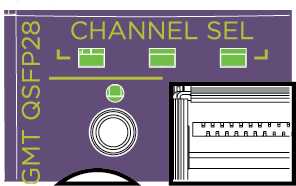
The meaning of the colors and states for the LED are described in QSFP-DD Port and Sub-channel Selector LEDs.
| Channel indicator | |||
|---|---|---|---|
| LED 0 | LED1 | LED 2 | QSFP-DD sub-channel |
| Off | Off | Off | 1 |
| Off | Off | Green | 2 |
| Off | Green | Off | 3 |
| Off | Green | Green | 4 |
| Green | Off | Off | 5 |
| Green | Off | Green | 6 |
| Green | Green | Off | 7 |
| Green | Green | Green | 8 |