
The 5720 Series supports LRM/MACsec adapters.
Use the following instructions to remove a LRM/MACsec adapter.

Caution
Connect the adapter to the host switch using only the SFP cable that is provided for this purpose. The use of other cables can damage the equipment.There are three options for attaching the LRM/MACsec adapter to a standard equipment rack. The adapter can be installed so that it is oriented horizontally or vertically. The adapter can also be attached to an adapter rack (part number 10966) horizontally with up to five other LRM/MACsec adapters. See Three Ways to Install the LRM/MACsec Adapter.

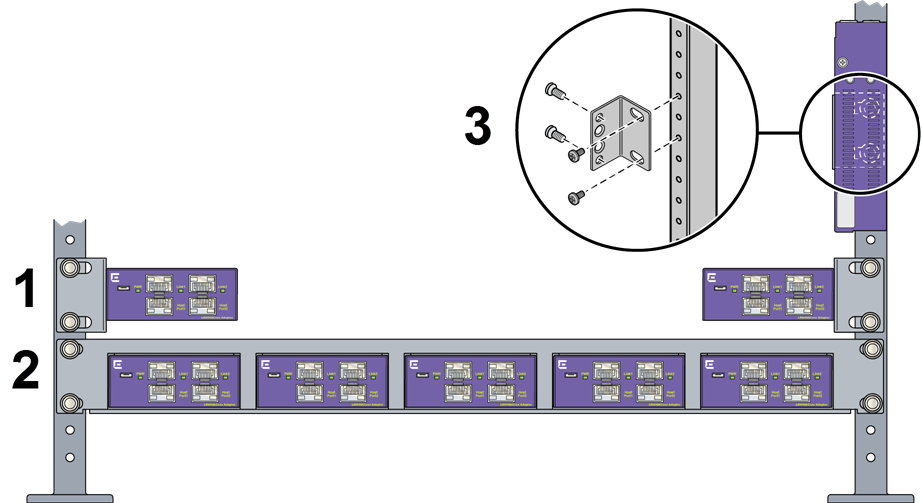
Before installing the LRM/MACsec Adapter, refer to Maximum Capacity for Using the LRM/MACsec Adapter to understand the requirements for connecting the adapter to your host switch.

Note
The LRM/MACsec Adapter is hot-swappable.Use the following instructions to replace or install a LRM/MACsec adapter that is oriented horizontally.
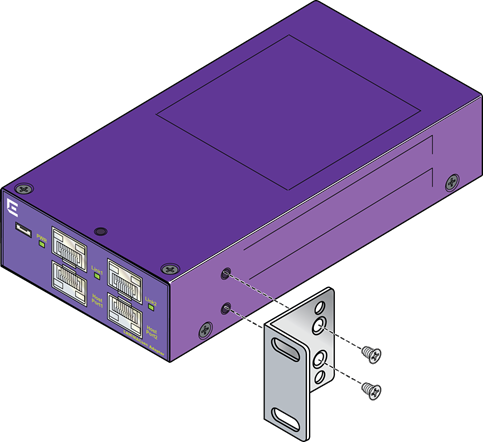
Use the following instructions to replace or install a LRM/MACsec adapter that is oriented vertically.
Use the following instructions to replace or install a LRM/MACsec adapter in an adapter rack.
The LRM/MACsec adapter connects to two ports the switch, providing LRM and/or MACsec functionality for those ports. The adapter also draws power from the host switch.
Note
Connect the adapter to the host switch using only the SFP cable that is provided for this purpose. The use of other cables can damage the equipment.Use the following instructions to connect the LRM/MACsec adapter to the switch and to power.
This SFP cable is provided especially for use with the LRM/MACsec Adapter, and is labeled as such. It is not a standard SFP cable.
Both Host Port1 and Host Port2 must be connected to the same host switch.
The LRM/MACsec Adapter receives power through its connection to the switch's SFP port. Additional power is supplied through a USB cable that connects the adapter to a power source. The USB cable is required for MACsec connections. It is optional for LRM-only connections.
If the power LED does not turn on, recheck the connections from the adapter to the switch and to the optional power source.
Refer to the user guide for your version of the operating system for information about configuring the switch to work with the LRM/MACsec adapter.