Configure the Stand-Alone Cluster Settings

An engine is an instance of a containerized application. This process follows the user interface to configure the orchestration engine settings for a stand-alone deployment. From the management IP address, log into the user interface using the admin credentials that you configured using the Basic Configuraton Wizard.
Go to Cluster Settings > Cluster Configuration and configure the stand-alone cluster in the following order, as shown on screen:
  1. Deployment Type
  2. Cluster Mode
  3. Pod Network Configuration
  4. Finish

To configure the cluster, do the following:

  1. For the Deployment Type, select ExtremeCloud Edge - Self-Orchestration.
  2. In the Cluster Mode section, select Standalone and click Next.
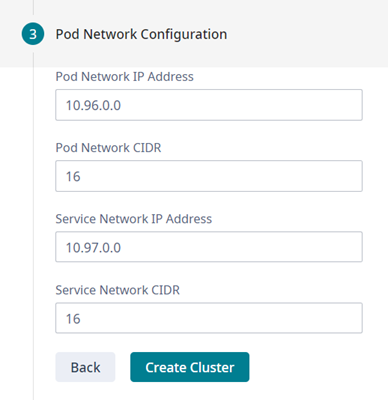
  3. Provide the settings for Pod Network Configuration:
    • Pod Network IP Address (default is 10.96.0.0)
    • Pod Network CIDR (default is 16)
    • Service Network IP Address (default is 10.97.0.0)
    • Service Network CIDR (default is 16)
    Click to expand in new window
    Pod Network Default Settings
    Pod Configuration Settings
  4. Select Create Cluster.
  5. Select Done.
    Note

    Note

    The cluster state is bound to the IP Address of the ICC interface. Do not change the ICC IP address once the cluster is set. If the ICC IP address changes after the cluster is created, the cluster state resets (even for standalone clusters) resets. If this occurs, cluster configuration must be re-initialized and any installed applications must be re-installed.
    Note

    Note

    For online installations, Kubernetes installs automatically when you create the cluster.