System Information
Go to to view system and manfacturing information. You can select either of
the following tabs:
- System Information tab
- Manufacturing Information
tab
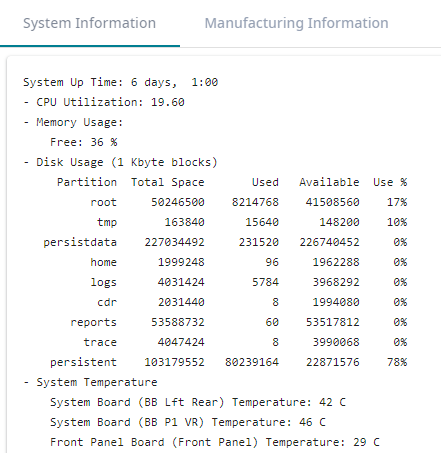
From the System Information
tab, you can view the following information about your system:
- System Up Time
- CPU Utilization
- Memory Usage—% of free memory.
- Disk Usage:
- Partitions
- Total Space
- Used space
- Available space
- Use %
- Flash Usage:
- Partitions
- Total Space
- Used space
- Available space
- Use %
- System Temperature—Temperatures for various system
components, including:
- System Boards
- Front Panel Boards
- I/O Module
- System Internal Expansion Boards
- Drive Backplane
- Power Supply
- Processors
- Memory Modules
- Fan Speed—Revolutions per minute (RPMs) for various system
fans.
- Power Supply—Information for each power supply source,
including:
- Model
- Serial Number
- Revision
- Port Interface status:
- Interface state
- Speed of interface

Note
Some fields do not display for all
appliance models. For example, Power Supply information does not display on the
1130C.
Example System Information
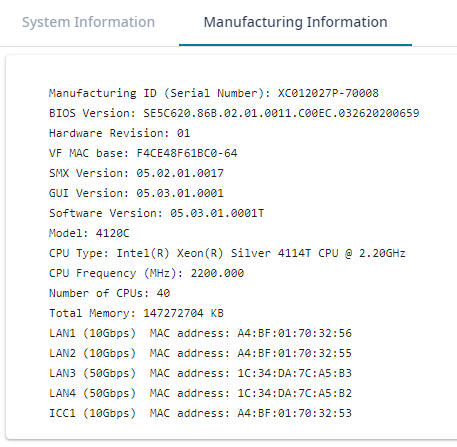
From the Manufacturing Information tab, you can view the following information:
- Manufacturing ID (Serial Number)
- BIOS Version
- Hardware Revision
- VF MAC base
- SMX Version
- Software Version
- Model
- CPU Type
- CPU Frequency
- Number of CPUs
- Total Memory
- MAC addresses for various system interfaces
- Locking ID
Example Manufacturing Information