
The AFC tab displays 6GHz SP specific parameters for the subset of APs supporting SP.
This section explains the information displayed under the AFC tab.
The dashboard summary displays Geo Location, AFC status, and SP Radio Operational Status information for APs at the selected site.

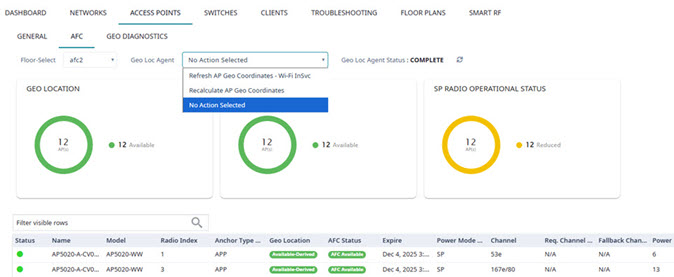
You can choose to view a specific floor or all floors at the site using the Floor-Select drop-down list. The default view is All floors.
No Action Selected — This is the default setting.
Refresh AP Geo Coordinates - Wi-Fi InSvc — Use this action to build subgraphs for new installations and for troubleshooting, for example, after a major power outage.
If this operation is unsuccessful because not enough Anchor APs are detected, install more Anchor APs in strategic locations, then select Recalculate AP Geo Coordinates.
Recalculate AP Geo Coordinates — Select this action when new GPS or Mobile APP coordinates are available, for example, when one or more Anchor APs are relocated or new Anchor APs are added for strategic purposes or for troubleshooting.
 to refresh the status display. Possible status indicators are:
 Ranging — FTM AP-to-AP ranging is in progress.
Queued — Geo-Location Agent is waiting until resources are available to process APs on the floor.
Building — Geo-Location Agent is processing APs on the floor, and building or redrawing subgraphs on the floor plan.
Complete — Refresh AP Geo Coordinates or Recalculate AP Geo Coordinates process is complete.
Error — An issue has occurred with the last action taken.

Note
Once the Geo Location Status is Complete, refresh the list of AFC APs.Subgraph — Name of the subgraph to which the AP belongs
FTM Ranges — Number of FTM-detected APs that are within range of the selected AP
Note
Req. Channel and Fallback Channel must be the same channel width. to manually
refresh the page anytime.
to manually
refresh the page anytime.Note
Save your page setting changes. Auto Refresh is implemented at the browser level and therefore will reset any selections or unsaved page setting changes. When using Auto Refresh, select a refresh interval that allows you to complete the operation within the defined interval. For best results, set Auto Refresh to OFF during configuration selections or selection of a large number of elements.