
The AP5022, AP5022S6D, and AP5022FX have the following Ethernet ports:
ETH0, ETH1: (2) wired Ethernet ports (RJ45)
ETH0: 100/1,000/2,500/5,000/10,000 Mbps autosensing link speed Ethernet port, Power over Ethernet (PoE) PD, MACsec (802.1AE)
ETH1: 100/1,000/2,500/5,000/10,000 Mbps autosensing link speed Ethernet port, PoE PD in or 15.4W PSE out mode (requires 802.3bt on Eth0)
802.3az Energy-Efficient Ethernet (EEE)
USB 2.0, Type A, 5V/1,000mA with PoE 802.3bt

Note
South Korea, Mexico, Taiwan, and Brazil require the use of Cat6 shielded cable.
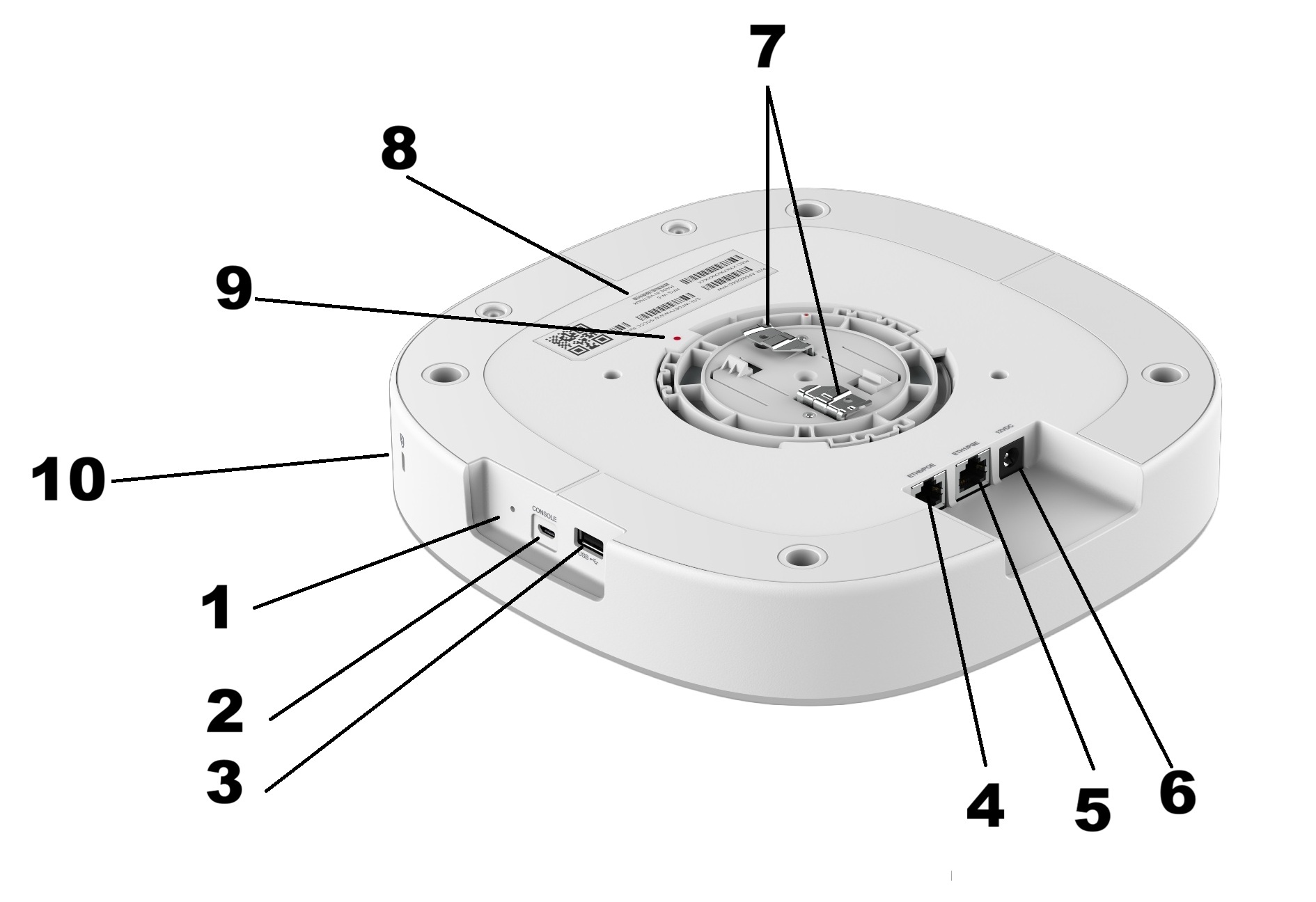
| Number | Label | Description |
|---|---|---|
| 1 | Reset | Push to do a reboot or factory reset. |
| 2 | Console | Micro USB console port for a serial connection between your management system and the access point. Use the port when you troubleshoot the AP. Tip: The best practice is to use the Extreme Networks micro USB cable (ACC-WIFI-MICRO-USB). When you connect to the device, the management station must have a VT100 emulation program, such as the terminal emulator TeraTerm Pro or Hilgraeve HyperTerminal. Set your baud rate to 115200.
Note: The console port can only be used with the Extreme Networks console cable. You could damage the AP if you use another cable.
|
| 3 | USB | 2.0 USB type A. Used with a thumb drive or other external device. |
| 4 | ETH0/PoE | Ethernet ports. |
| 5 | ETH1/PoE | |
| 6 | 12vDC | Connection for 12 volt DC adapter. |
| 7 | - | Metal clips for T-bar installation. |
| 8 | - | Label for MAC address, QR code, etc. |
| 9 | - | Red dot for positioning the AP during installment. |
| 10 | Keningston security slot | Used to secure the AP. |
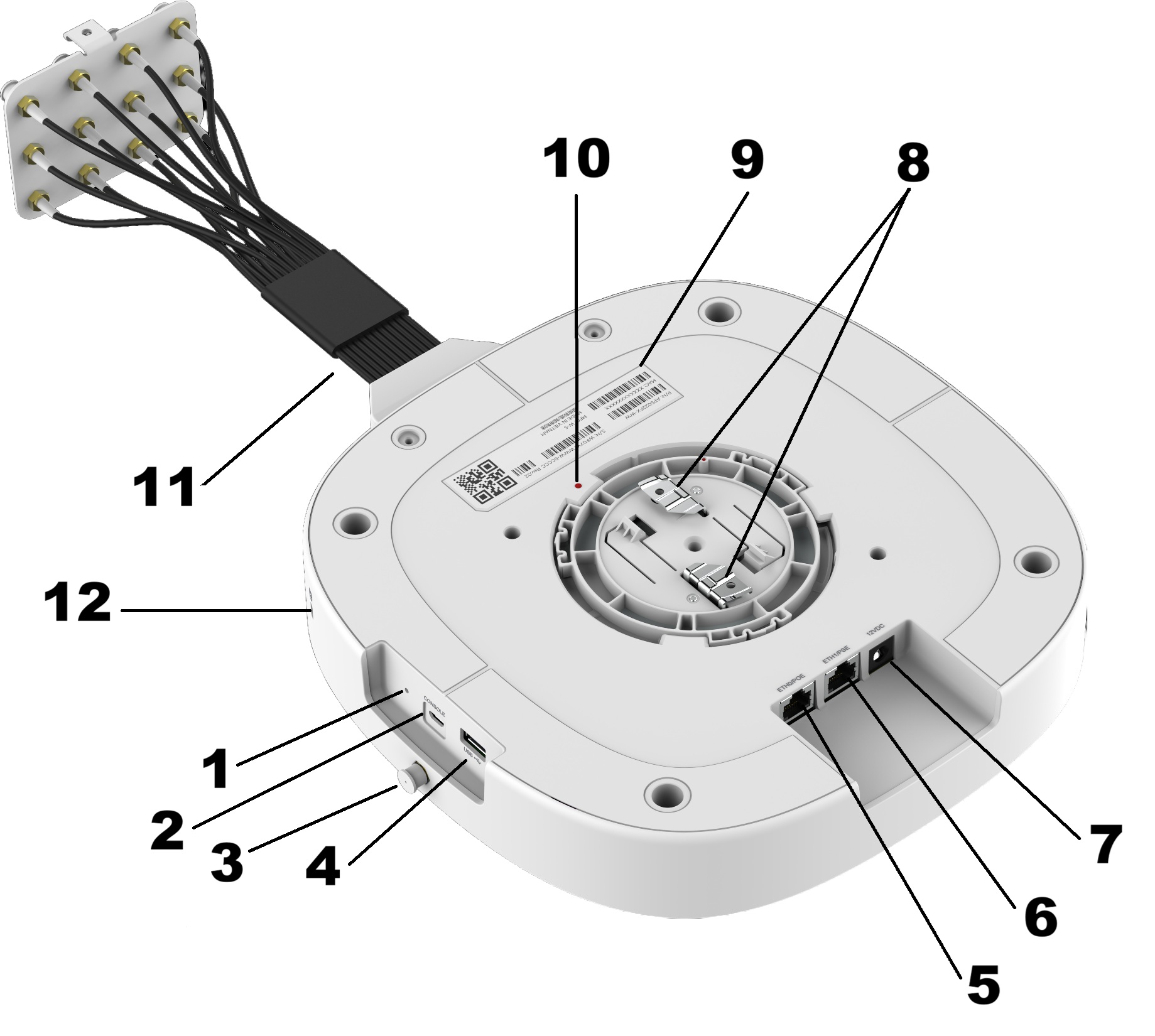
| Number | Label | Description |
|---|---|---|
| 1 | Reset | Push to do a reboot or factory reset. |
| 2 | Console | Micro USB console port for a serial connection between your management system and the access point. Use the port when you troubleshoot the AP. Tip: The best practice is to use the Extreme Networks micro USB cable (ACC-WIFI-MICRO-USB). When you connect to the device, the management station must have a VT100 emulation program, such as the terminal emulator TeraTerm Pro or Hilgraeve HyperTerminal. Set your baud rate to 115200.
Note: The console port can only be used with the Extreme Networks console cable. You could damage the AP if you use another cable.
|
| 3 | BLE | Bluetooth Low Energy. May have a dust cap on it. |
| 4 | USB | 2.0 USB type A. Used with a thumb drive or other external device. |
| 5 | ETH0/PoE |
Ethernet ports. |
| 6 | ETH1/PSE | |
| 7 | 12vDC | Connection for 12 volt DC adapter. |
| 8 | - | Metal clips for T-bar installation. |
| 9 | - | Label for MAC address, QR code, etc. |
| 10 | - | Red dot for positioning the AP during installment. |
| 11 | - | Break-out cable for antenna connections. |
| 12 | Keningston security slot | Used to secure the AP. |