Indoor Access Point 6GHz Standard Power Deployment Guide
>
Monitor and Troubleshoot
>
ExtremeCloud IQ Troubleshoot and Monitor
> View AFC Geo-Location Floor Report
Extreme Networks, Inc. June 01, 2026
Search this document
Print this page
Email this page
View PDF
Previous
Next
Abstract
Preface
Text Conventions
Documentation and Training
Send Feedback
Help and Support
Overview
New in this Guide
Supported APs for AFC in Canada and the United States
Extreme Networks 6GHz Standard Power Solution
Indoor Use Cases for 6GHz Standard Power
Geo-Location Agent
AFC Mobile App
Supported Devices for Mobile App
Requirements for AFC Mobile App
AFC Mobile App Restrictions
Deployment
Deployment Workflow
Deployment Planning
AFC Explorer
Measure GPS Signal Strength
Site Floor Plan
Confirm GPS Availability With AFC Mobile App
Confirm GPS Availability With iOS Mobile App
Confirm GPS Availability With Android Mobile App
Configuration
ExtremeCloud IQ Configuration
ExtremeCloud IQ Controller Configuration
Set Anchor APs with AFC Mobile App
Set Anchor APs with iOS App
Set Anchor APs with Android App
Monitor and Troubleshoot
The 6GHz Standard Power Startup Process
Power Outages and Planned Outages
6GHz Radio Power AFC
Geo-location is Unavailable
ExtremeCloud IQ Troubleshoot and Monitor
Recalculate Geo-Location Co-ordinates
View AFC Geo-Location Floor Report
ExtremeCloud IQ Controller Troubleshoot and Monitor
ExtremeCloud IQ Controller Image Upgrade
AFC Glossary
6 GHz Standard Power
Automated Frequency Coordination (AFC)
AFC Service Provider
AFC Agent
Fine Time Measurement (FTM)
Fine Time Measurement (FTM) Ranging
Geo-Location Agent
Low Power Indoor (LPI)
View AFC Geo-Location Floor Report
About this task
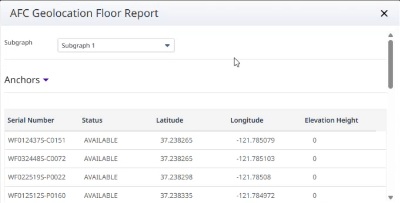
Use the AFC Geo-Location Floor Report for debugging issues and confirming if the Geo-location Agent was able to calculate the geo-coordinates.
AFC Geo-Location Floor Report
Procedure
Select a single AP or all of the APs.
Navigate
Utilities
>
Diagnostics
>
AFC Geolocation Report
Results
AFC Geo-Location Floor Report window appears