
The stacking-support option is disabled by default for Summit X460 switches. For more information, see Enabling and Disabling the Stacking-Support Option.
The stacking port selection option, which allows you to choose between native and alternate ports, is enabled by default for X460 switches. For more information, see Selecting Native and Alternate Stacking Ports.

Stacking Methods for X460 Switches
| Stacking Method | Speed per Link (HDX) | Cable Type and Lengths |
|---|---|---|
| SummitStack (Rear panel, with module) | 10 Gbps | 0.5m, 1.5m, 3.0m, 5m 20Gbps Stacking Cable |
| SummitStack-V (with XGM3-2sf, XGM3S-2sf, XGM3S-2xf) |
10 Gbps | 0.5m–40km SFP+, XFP |
| SummitStack-V80 (with SSv80) |
20 Gbps | 0.5m–100m QSFP+ only |
For X460 native stacking, install a VIM2-SummitStack or VIM2-SummitStack-V80 port option card into the rear of the switch.
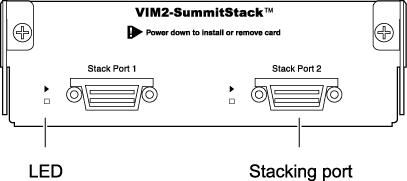

For a complete listing of compatible cables and optical transceivers, see the Extreme Hardware/Software Compatibility and Recommendation Matrices.
To use alternate stacking on a Summit X460 switch, you must install an XGM3-2sf, XGM3S-2sf, or XGM3S-2xf port option card to add 10-Gbps ports to the switch. Alternate Stacking Ports for X460 Switches shows which port option cards are compatible with each X460 switch model for alternate stacking.
Alternate Stacking Ports for X460 Switches
| Switch Model | Type or location of Native Stacking Ports | Alternate Stacking Ports | Location of Alternate Stacking Ports |
|---|---|---|---|
| X460-24t X460-24x X460-24p |
SummitStack module or
SummitStack-V80 module |
S1,S2
(29,30) |
XGM3-2sf or XGM3S-2sf or XGM3S-2xf |
| X460-48t X460-48p |
SummitStack module or SummitStack-V80 module |
S1,S2 (53,54) |
XGM3-2sf or XGM3S-2sf or XGM3S-2xf |
| X460-48x | SummitStack module or SummitStack-V80 module |
S1,S2 (49,50) |
XGM3S-2sf or XGM3S-2xf |
 Print
this page
Print
this page Email this topic
 Feedback
 View PDF
 Download EPUB