Before you begin
Mount the AP in the desired location.
About this task
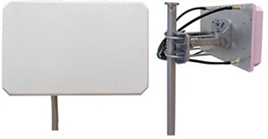
AIO-HQ17020-N is a dual polarized panel antenna. It measures 290mm x 185mm x 50 mm (11.41 inches x 7.28 inches x 1.96 inches). It ships with a mounting bracket.
Procedure
- Unpack the antenna from the shipping materials.
- Assemble the mounting bracket.
The pivot screws should be only finger-tight.
- Mount the mounting bracket to the wall or pole.
Tighten the non-pivot mounting hardware to 45 inch-lbs and tighten the pole cable strap screw so they are tight and cannot be moved on the pole.
- Assemble the antenna to the mounting bracket using 4 nuts.
Tighten the nuts to 45 inch-lbs.
- Attach the 4 cables to the AP for the specified frequencies.
Tighten the N connectors to 20 inch-pounds. See the
AP installation guide for information on connecting the antenna to the correct ports.
- Adjust the mounting bracket angles so the panel antenna is pointing in the desired direction.
Tighten the pivot screws to 50 -inch lbs.
