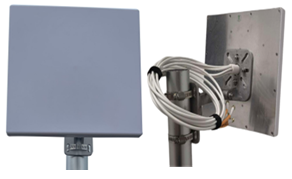
The AI-TH14035 antenna is an indoor panel antenna that measures 370mm x 370mm x 25mm (14.56in x 14.56in. x 0.98in) and weighs 2.34 kg (5.16 lbs). It ships with a mounting bracket.
Procedure
Unpack the antenna from the shipping materials.
Assemble the mounting bracket. The pivot screws should be only finger-tight.
Mount the mounting bracket to the wall or pole.
Tighten the non-pivot mounting hardware to 45 inch-lbs and tighten the pole cable strap screw so they are tight and cannot be moved on the pole.
Mount the mounting bracket to the wall or pole.
Assemble the antenna to the mounting bracket.
Tighten the fasteners to 45-inch lbs.
Attach the 4 cables to the AP for the specified frequencies.
Tighten the RP-SMA connectors to 5 inch-pounds. See the AP installation guide for information on connecting the antenna to the correct ports.
Adjust the mounting bracket angles so the panel antenna is pointing in the desired direction.