
Connect each antenna lead to the correct antenna port on the AP. Use the following table as a guide when you connect your antennas.

Note
Ports 1 and3 have fixed, integral antennas that cannot be removed. Port 2 and 4 are for optional external antennas.
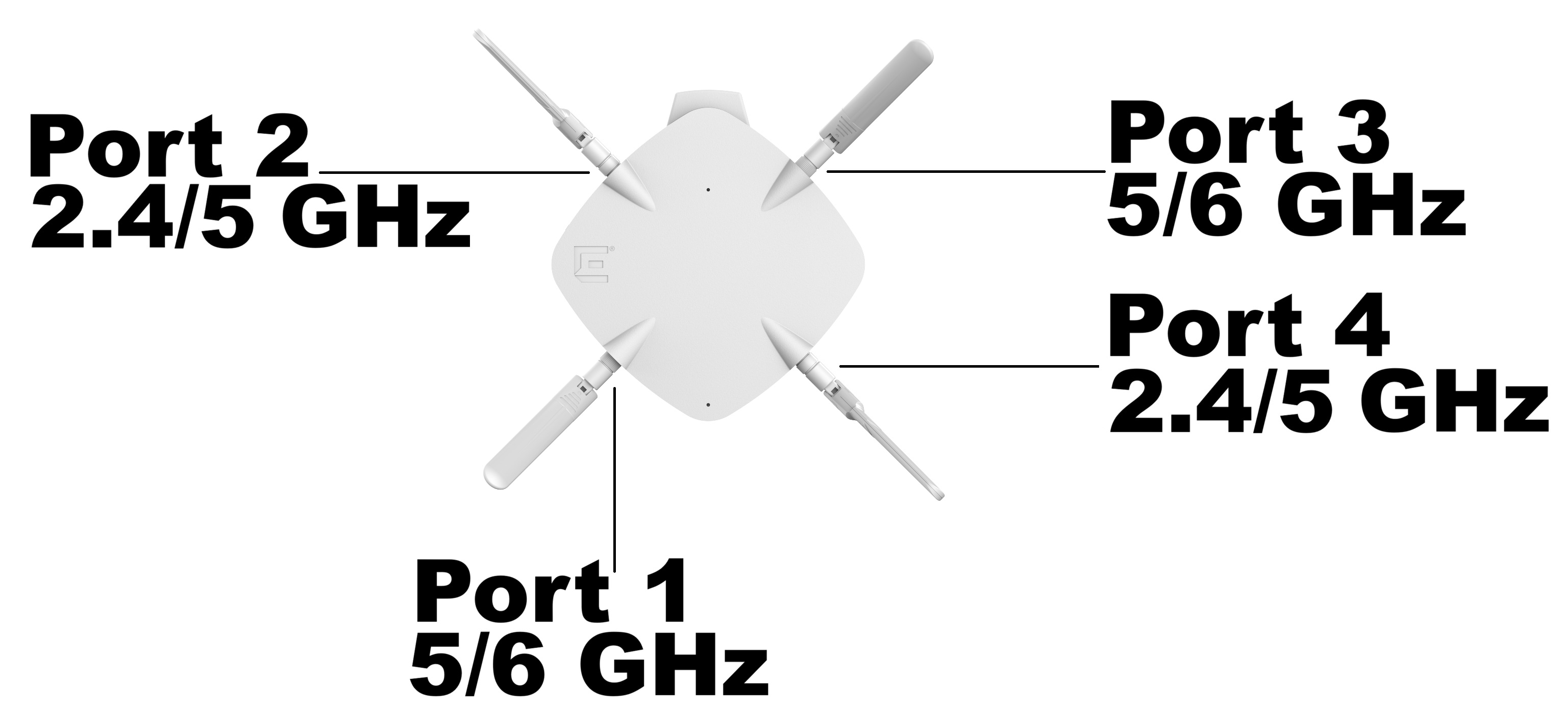
| Antenna Part Number | AP3020X Ports | |||
|---|---|---|---|---|
| Antenna Port 1 (6GHz) | Antenna Port 2 (2.4/5GHz) | Antenna Port 3 (6GHz) | Antenna Port 4 (2.4/5GHz) | |
| ML-2452-APA2-02 (1 lead available) | N/A | Connect the antenna lead to any available port | N/A | Connect the antenna lead to any available port |
| AIO-DD75060-RPSMA (2 leads available) | N/A | Connect lead Antenna#2: Left to port 2 | N/A | Connect lead Antenna#1: Right to port 4 |
| AIO-DD05120-RPSMA (2 leads available) | N/A | Connect lead Antenna#2: Left to port 2 | N/A | Connect lead Antenna#1: Right to port 4 |
| ML-2452-SEC6M4-036 (4 leads available; use 2 leads only) | N/A | Connect lead "+45" to port 2 | N/A | Connect lead "-45" to port 4 |
| AI-TQ08055 (4 leads available; use 2 leads only) | N/A | Connect lead 1/A V-Pol to port 2 | N/A | Connect lead 2/B H-Pol to port 4 |
| AI-TQ06120 (4 leads available; use 2 leads only) | N/A | Connect lead 1/A V-Pol to port 2 | N/A | Connect lead 2/B H-Pol to port 4 |
| AIO-DD15020-RPSMA (2 leads available; use 2 leads only) | N/A | Connect lead 1/A V-Pol to port 2 | N/A | Connect lead 2/B H-Pol to port 4 |
| AI-DP04360S | N/A | Connect the antenna lead to any available port | N/A | Connect the antenna lead to any available port |
| Operational Mode | Radio 1 | Radio 2 |
|---|---|---|
| Mode 1 | 2.4 GHz-Full 16dBm Ports 2 and 4 | 5 GHz-Full (5.15-5.85 GHz) Ports 2 and 4 |
| Mode 2 | 6 GHz-Full (5.945 GHz to 7.125 GHz) Low Power Indoor (LPI); Standard Power (SP). Ports 1 and 3 | 5 GHz-Full (5.15-5.85 GHz) Ports 1 and 3 |
| Mode 3 | 5 GHz-Low (5.15-5.35 GHz) Ports 2 and 4 | 5 GHz-High (5.5-5.85 GHz) Ports 2 and 4 |