
Before you install Tunnel Concentrator, you must deploy an ExtremeCloud Edge - Self-Orchestration deployment on Universal Compute Platform. Tunnel Concentrator runs on this deployment type. For procedures, see the document ExtremeCloud Edge - Self-Orchestration Deployment Guide.
Make sure that your installation includes:
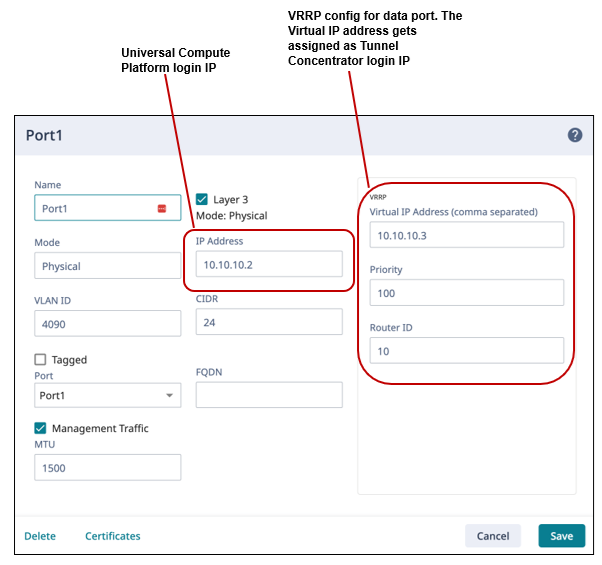
VRRP configured on a data port (Required)—Configure a VRRP virtual IP address on one of the Universal Compute Platform data ports. The VRRP address provides Tunnel Concentrator with its login IP address and is required for initial Tunnel Concentrator activation. However, once the instance is onboarded to the cloud, the VRRP alias becomes optional.
For a full VRRP configuration, see the "Add a Port" procedure within the ExtremeCloud Edge - Self-Orchestration Deployment Guide.

Note
For the VRRP address, use the data port that provides the best connectivity to the network. As a best practice, use the same segment that provides the default gateway for Universal Compute Platform.
Make sure that the VRRP address does not overlap with existing addresses.
If you are deploying multiple Tunnel Concentrator instances on a single host, you need separate VRRP addresses for each instance.

ICC1 IP Address—Configure an ICC1 IP address, but leave ICC1 connectivity disabled. Make sure that the address does not overlap with existing routing domains. See Deployment Considerations and Restrictions for more information.
LAG (Optional)—If you want to deploy LAG ports on Tunnel Concentrator, configure LAG on Universal Compute Platform first. For more information, see LAG Configuration Summary.
Note
For a Tunnel Concentrator installation example that includes sample ExtremeCloud Edge settings, see Installation Example .