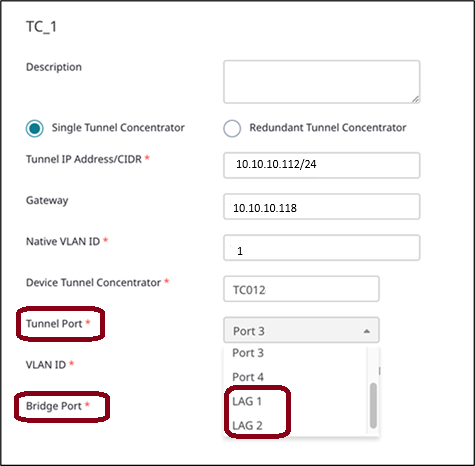
Tunnel Concentrator supports Link Aggregation (LAG) for the data ports. LAG interfaces increase link throughput and provide redundancy in case of a link failure.
To deploy the feature on Tunnel Concentrator, you must first configure LAG for Universal Compute Platform. The LAG port members that you configure on Universal Compute Platform get synced to Tunnel Concentrator automatically. To complete the setup, configure Tunnel Concentrator to use the LAG port. Once the feature is configured, LACP LAG on Universal Compute Platform creates and manages the aggregated link, and static LAG from Tunnel Concentrator runs on that link.

Note
Tunnel Concentrator supports static LAG only. Universal Compute Platform supports LACP LAG only.| Step | Task | For a procedure... |
|---|---|---|
| 1 |
On the Universal Compute Platform host: Configure LACP LAG for the data interface. | "Configure LAG Ports" in Universal Compute Platform User Guide |
| 2 |
Configure static LAG for Tunnel Concentrator from your management application. Make sure the static LAG configuration matches the host's LAG configuration.
On ExtremeCloud IQ, assign the LAG port to the Tunnel Concentrator service:
On ExtremeCloud IQ Controller, assign the LAG port to Tunnel Concentrator device:
|
For ExtremeCloud IQ: Configure Tunnel Concentrator Service
For ExtremeCloud IQ Controller: |