
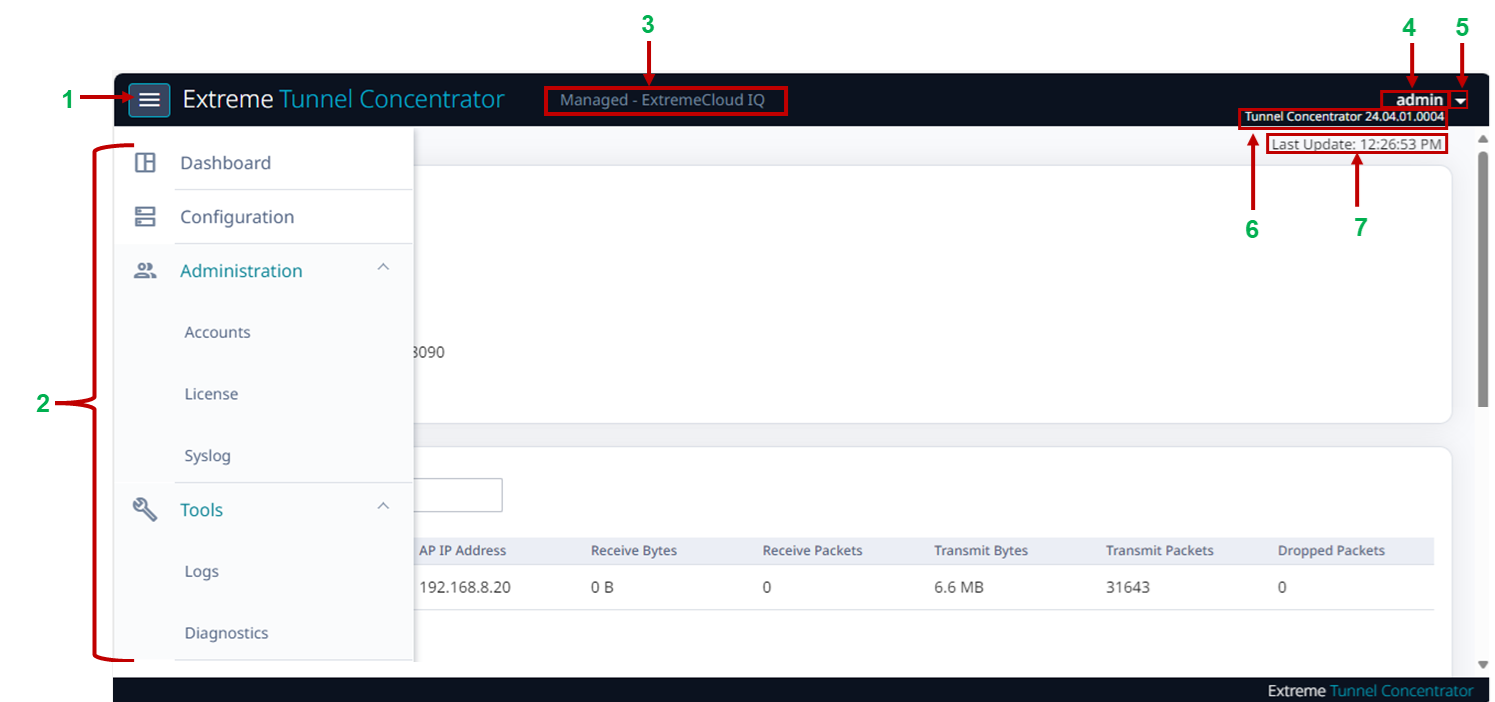
Tunnel Concentrator User Interface illustrates the Tunnel Concentrator User Interface. For a description of the various callouts, see Tunnel Concentrator User Interface Callout Items, which follows the image.

| Callout | Description |
|---|---|
| 1 |  (Navigation icon)—Select this icon to open the navigation menu. (Navigation icon)—Select this icon to open the navigation menu. |
| 2 | Navigation menu—Select one of the menu items to open the applicable configuration page. |
| 3 | Management mode—Displays the application that is selected currently as the management application for Tunnel Concentrator. |
| 4 | Username of the logged-in user. |
| 5 |  (User Actions)—Select this icon to view the user-specific menu options such as logout or change password. (User Actions)—Select this icon to view the user-specific menu options such as logout or change password. |
| 6 | Version—Displays the full Tunnel Concentrator version number with the build number appended. |
| 7 | Time of the last page refresh. |