
Before deploying Tunnel Concentrator, consider the following:
Tunnel Concentrator preserves DSCP markings for both upstream and downstream directions.
By default, Tunnel Concentrator blocks non-essential broadcasts (everything except DHCP and ARP).
The VLAN and subnet that you apply to the tunnel termination point on Tunnel Concentrator must be different from the VLAN and subnet for client traffic.
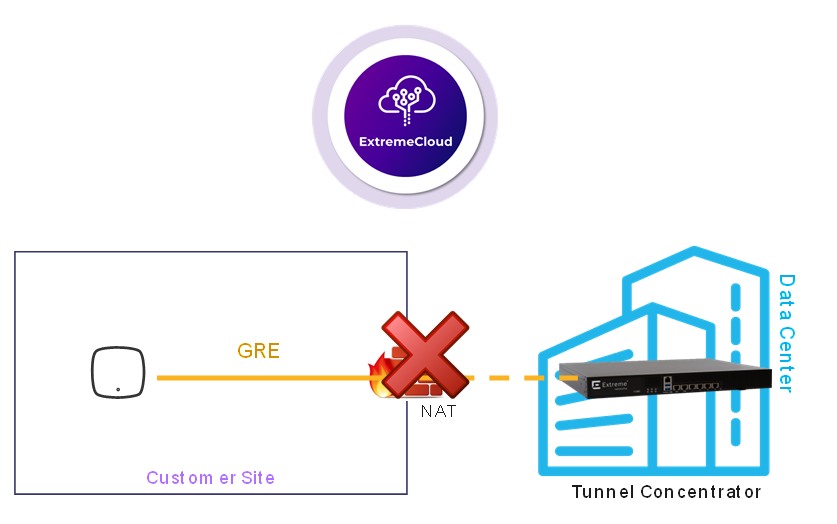
The use of a NAT router between the access point and Tunnel Concentrator is supported only for secure tunneling with IPsec. A NAT router is not supported for non-encrypted GRE tunneling as illustrated in the following image, which illustrates a GRE tunneling deployment with ExtremeCloud IQ as the management application (and GRE tunneling).

The use of the ICC1 interface for Out-of-Band management of Tunnel Concentrator is not recommended for the following reasons:
The ICC1 interface is intended for backplane inter-connect for multi-node cluster configurations. This configuration is not currently supported for Self-Orchestration deployments.
ExtremeCloud Edge leverages Kubernetes to manage the state of installed applications. The Kubernetes "cluster" is bound to the address of ICC interfaces (or VRRP if it's provisioned). However, if those addresses change, or need to be modified, Kubernetes recognizes that the existing configuration binding is no longer valid and unwinds the installation, resulting in the purging of the installed applications. In other words, if the ICC IP addresses are modified, the system resets to a pre-deployment state. As a protection against accidental destruction, the Universal Compute Platform user interface prevents modifications to ICC addresses once the deployment type is initialized, which occurs when the standalone cluster is created.
Tunnel Concentrator relies on the routing table of the Universal Compute Platform host to be able to reach the management entity. Often, the routing path for out-of-band management segments is constrained and does not provide the necessary access to the Internet, which is required for ExtremeCloud IQ.
For these reasons, ICC1 IP settings must be configured, but we strongly recommend that you leave network connectivity disabled. Instead, we recommend that you configure the interface settings to a nonoverlapping network segment, preferably a reserved and not in use address space. Configure the host to default all network access to a default gateway path through one of the data ports.