Including Custom Apps

To add custom apps to the L7 Filter Rule Definition dialog:

  1. From the Filter Rule Definition dialog, select L7.
  2. Click Custom Web Application.
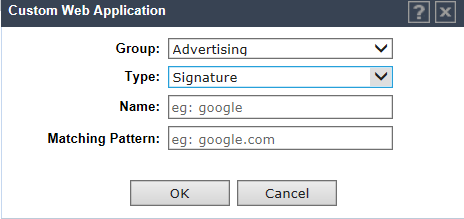
  3. Click the plus sign and enter the following:
    • Group. Internet applications are organized in groups based on the type or purpose of the application. Once you select an Application Group, the Application Name drop-down is populated with application names that are part of the specified group.

      The group names are pre-defined standard Extreme Application Analytics™ signature groups. The group names are case-sensitive.

    • Type. Type of authentication. Valid values are:
      • Signature. Standard IP address sent in Signature.
      • Layer 3 host name. Authentication based on User Defined IP/subnet parameter in Layer 3 configuration. You can define up to 64 host name patterns per controller or site.
    • The Matching Pattern is the URL pattern that is associated with the application (case-sensitive, up to 64 characters).
    Click to expand in new window
    Adding Custom Web Applications
    Graphics/L7_custom_signature_apps.png
  4. Click OK.
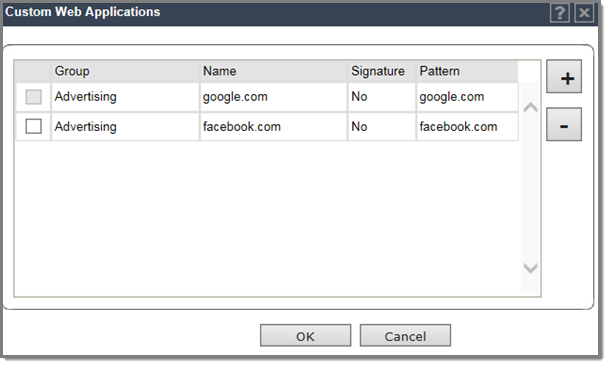
    The Custom Web Application list displays.
    Click to expand in new window
    Custom Web Applications List
    Graphics/custom_web_app_list.png
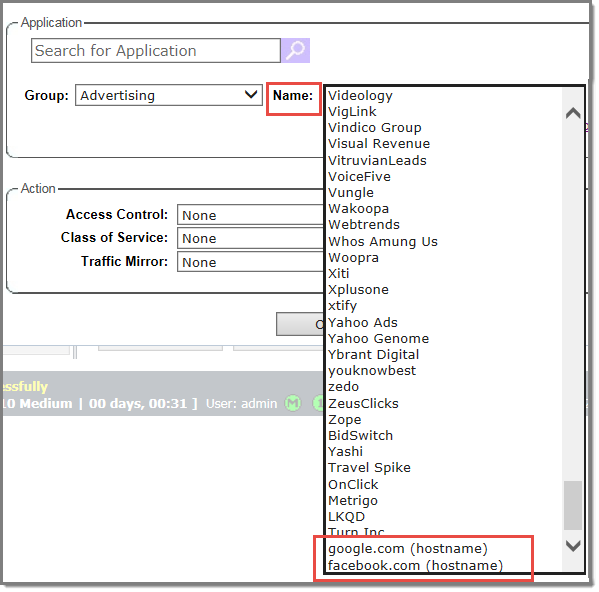
  5. Select the check box and click OK to add the custom app to the Name drop-down field on the L7 Configuration dialog.
    Click to expand in new window
    L7 Configuration: Custom Apps with hostname rule

    Graphics/custom_apps_in_name_list.png