IP Address Configuration
The L3 (IP) address
definition is only required for Physical port and Routed topologies. For Bridge Traffic
Locally at EWC topologies, L3 configuration is
optional. L3 configuration would be necessary if services such as DHCP (Dynamic Host Configuration Protocol), captive portal, AP
registration (with up to 4 topologies) are required over the configured network segment or
if controller management operations are intended to be done through the configured
interface.
Bridge
Traffic Locally at AP topologies can define a Mask and do not require the definition of a
corresponding IP address since all traffic for users in that VNS will be directly bridged
by the AP at the local network point of attachment (VLAN (Virtual LAN) at AP port).
To define the IP address for the
topology:
- From the top
menu, click Controller> Topologies, or VNS > Topologies.
- Click New to create a new topology or
select the topology you want to define the IP address for. The Topologies window is displayed.
Depending on the preselected options, two or three tabs are displayed.
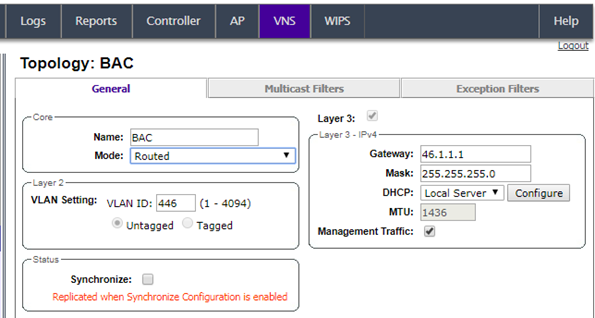
Configuring IP Address for Routed Topology
- For IP interface configuration for Routed topologies, configure the following Layer 3 parameters.
- In the
Gateway field,
type the controller's own IP address in that VNS. This IP address is the
default gateway for the VNS. The controller advertises this address to the
wireless devices when they sign on. For routed VNSs, it corresponds to the IP
address that is communicated to MUs (in the VNS) as the default gateway for the
VNS subnet. (MUs target the controller's interface in their effort to route
packets to an external host.)

Note
The Gateway
field only supports IPv4 addresses.
- In the
Mask field, type
the appropriate subnet mask for the IP address. This separates the network
portion from the host portion of the address (typically, 255.255.255.0).
- If desired, enable Management traffic.
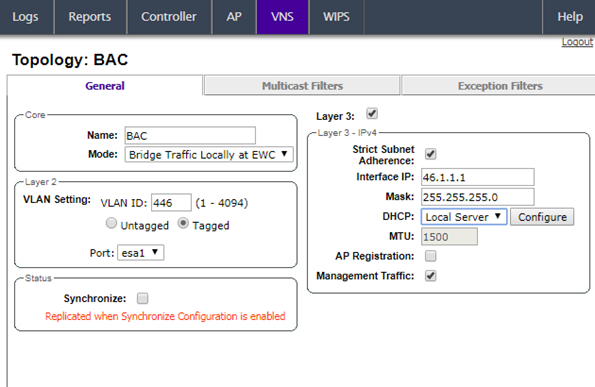
- For IP interface
configuration for Bridge Traffic
Locally at
EWC Topologies, configure the
following Layer 3 parameters.
IP Address for Bridged Traffic Locally
- In the
Interface IP field, type
the IP address that corresponds to the controller's own point of presence on the
VLAN. In this case, the controller's interface is typically not the gateway for the
subnet. The gateway for the subnet is the infrastructure router defined to handle the
VLAN.
- In the
Mask field, type the
appropriate subnet mask for the IP address. This separates the network portion from
the host portion of the address (typically, 255.255.255.0).
- Configure Strict
Subnet Adherence.
- If desired,
configure AP Registration. If selected, wireless APs can use this port for discovery
and registration.
- If desired,
enable Management traffic.


 Print
this page
Print
this page Email this topic
 Feedback
 View PDF
 Download EPUB