Configuring Common Configuration Default AP Settings
To configure common
configuration default AP settings:
-
From the top menu, click
AP.
-
In the left pane, click
.
The
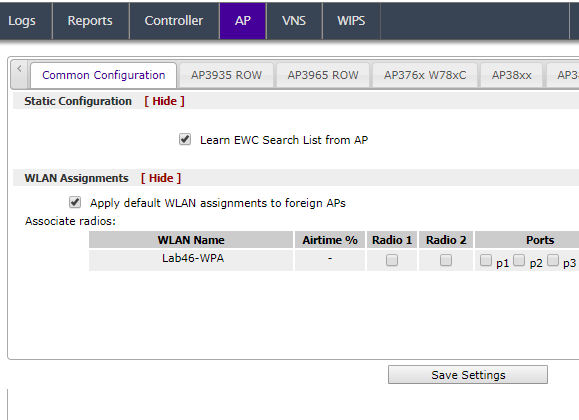
Common Configuration tab is displayed.

Note
Ports 1, 2, and
3, are available on the AP3912. Port 1 is the port that corresponds to the Camera
(CAM) function of the AP3916ic.
-
In the
Static Configuration section, you
can specify an EWC search list or use the search
list provided from the AP. Do one of the following:
Check
Learn EWC Search List from
AP to accept the AP's search list, or
clear the check box to specify a common search list for all APs. For more information
about creating
an EWC Search List, see
Static Configuration Properties.
-
In the
WLAN Assignments section, you can
associate a WLAN (Wireless Local Area Network) assignment to a radio.
- If the controller is in an availability pair, you
can apply default WLAN assignments to foreign APs, by selecting the Apply default WLAN assignments to foreign
APs check box. For more information, see Availability.
- To associate a WLAN Service in the list to a radio
and or a client port, select the check box matching the radio and or port for the
selected WLAN.
- One WLAN can be assigned per port. The assignment
enables the port.
- Wireless and wired users associated to the same WLAN
service receive identical service. They are affected by the same
policies and filters.
Note
Airtime % is available for
AP38xx and AP39xx access point models that are assigned WLANS configured with
Reserved Airtime.
- Click Save
Settings.


 Print
this page
Print
this page Email this topic
 Feedback
 View PDF
 Download EPUB