Configuring Airtime Fairness: Reservation Mode

With Airtime Reservation, reserve a percentage of air time for clients associated to a WLAN. The Airtime Reservation algorithm monitors the down link traffic from all clients. When congestion starts, the reservation algorithm guarantees that these clients have access to the air for the configured amount of time. If clients do not request to transmit, the reserved airtime is consumed by other clients.
Note

Note

Airtime Reservation Mode is supported by AP38xx and AP39xx models. The legacy Flexible Client Access feature continues to support AP37xx models. Configuring Airtime Reservation Mode may cause the AP to reboot.

  1. Go to VNS > Global > Wireless QoS.
  2. Click Configure
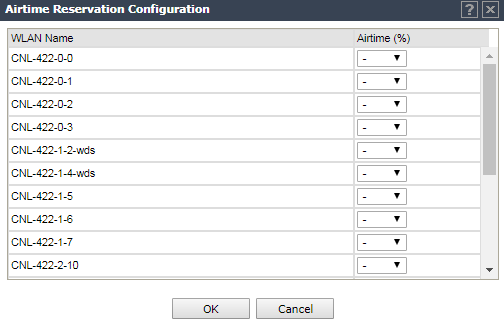
    The Airtime Reservation Configuration dialog displays.
    Click to expand in new window
    Airtime Reservation Configuration Dialog
    Graphics/airtime_reservation_dialog.png
  3. Select the percentage of airtime for each WLAN.
    Airtime Reservation configuration rules:
    • Four WLAN services associated with a controller can be configured with Airtime Reservation. The total Airtime Reservation of four WLAN services is limited to 80 percent of the total. The remaining 20 percent of the total time is reserved for the other WLAN services.
    • If a WLAN service with Airtime Reservation is associated to a radio, the QCA ATF module is turned on, and the AP will restart in order to load the ATF module. The number of clients supported by QCA ATF is 50.
    • If the radio does not have a WLAN service with Airtime Reservation associated, the QCA ATF module is turned off.
    • When Mesh and WDS is configured, the first WLAN gets 20 percent of the available channel airtime. The other clients on the radio channel get the remaining airtime. This takes co-channel interference into account. If there is 50 percent interference, WLAN1 gets 20 percent of the available 50 percent.

    When configured, Airtime Fairness percentage displays on the WLAN Assignment page for the AP.