Assigning WLAN Services to Client PortsNEW!

When configuring client ports on access point models AP391x that offer client ports, you can assign one or more client ports to a single WLAN service. Client ports offer 802.1x authentication and policy support.
Note

Note

Network access for the AP3916ic camera function is controlled through policy definition, assigned as a the CAM port. The camera port on the AP3916 is treated as a wired client port.
  1. From the top menu, click AP.
  2. Select a specific AP.
    Port options depend on the AP model you select:
    • AP3912 supports wired client ports 1-3.
    • AP3916ic supports the wired CAM port for a camera.
    • AP3917i/e supports 1 client port.
    • Additionally, all the AP391x models, including AP3915i/e, support IoT Thread Gateway using the AP as a border gateway router.
    The AP Properties dialog appears.
  3. Click Configure.
  4. Select the WLAN Assignment tab.
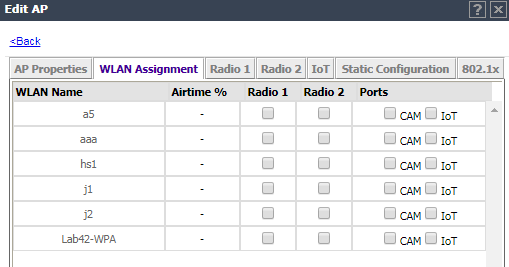
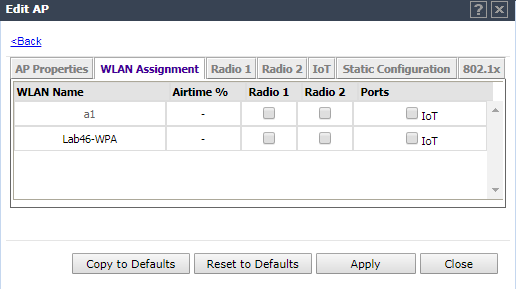
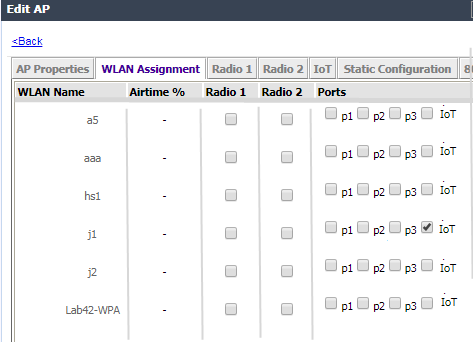
  5. Select one or more client ports for each WLAN Service.

    All Port Assignments:

    • One WLAN can be assigned per port. The assignment enables the port.
    • Wireless and wired users associated to the same WLAN service receive identical service. They are affected by the same policies and filters.
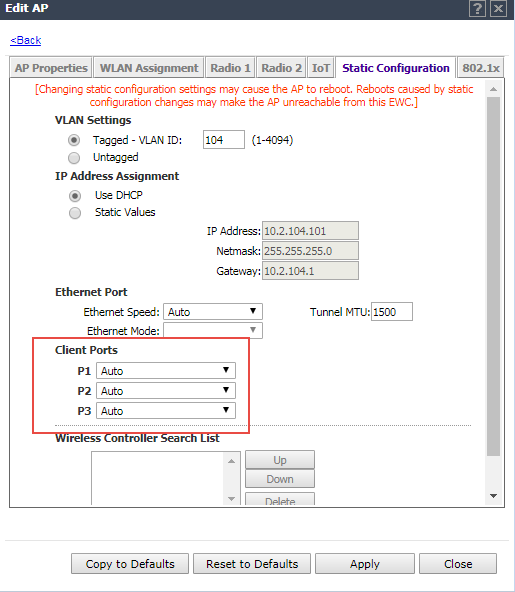
    The wired ports for the AP391x default to auto-negotiation for speed and mode. To configure fixed speed and mode values (for instance, 100Mbps and Full Duplex), select the Static Configuration tab and select the speed and mode settings for the Ethernet port and each client port. Configure the values that the client hardware supports.
    Click to expand in new window
    Port Configuration for AP3912 Wired Ports
    Graphics/port_assign_static_config.png
    CAM Port Assignments:
    • The topology associated with the role that is assigned to the CAM port (either through WLAN assignment or through device MBA authentication) must be configured to allow ONVIF camera discovery and video streaming. Configure the default topology to explicitly allow multicast bridging of WS-Discovery group (239.255.255.0).
    • When the camera port is unassigned, it is disabled, and the camera is disconnected from the network and turned off.
    • One policy definition for wired and wireless users. Users on wired ports can receive the same default policy. However, the camera function (CAM) can be assigned a specific device policy to separate user service and video surveillance networks.
    • The camera function can be assigned to B@AP and B@AC topologies and Mac Based Authentication for dynamic policies.
    • Configure MAC authentication (MBA) for network attached devices or collect device metrics through RADIUS accounting from the Auth&Acct tab.
    • WLAN SSID, Privacy, and QoS settings are not relevant for the camera functionality.
    • Captive Portal and 802.1x are not supported on the CAM port.
    Note

    Note

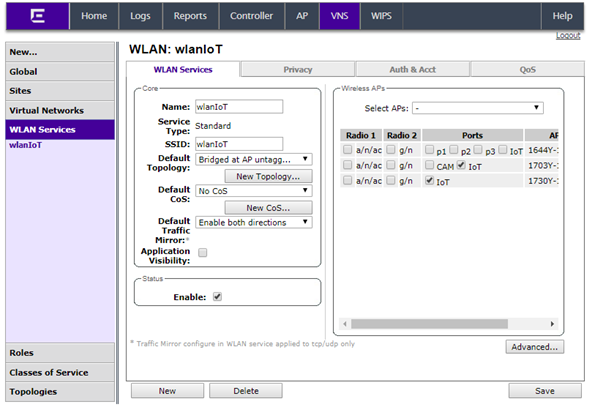
    Bind the WLAN Service to the VNS to activate service.
    Click to expand in new window
    WLAN Services Port Assignment
    Graphics/WLANS_port_assignments.png
    Click to expand in new window
    Assigning Ports to WLAN Service on the AP3912
    Graphics/port_assignments.png
    Click to expand in new window
    Assigning the Camera Port to WLAN Service on the AP3916ic
    Graphics/wlan_assign_camera_port.png
    Click to expand in new window
    Assigning the IoT Port to WLAN Service on the AP3915
    Graphics/wlan_assignment_iot_port.png