
Configure an AP with integrated BLE radio as an Eddystone-url Beacon in an IoT network. The following APs offer integrated BLE/802.15.4 radios: AP3912i , AP3915i/e, AP3916ic, AP3917i/e/k.
To configure Eddystone-url Beacon support from the IoT tab:

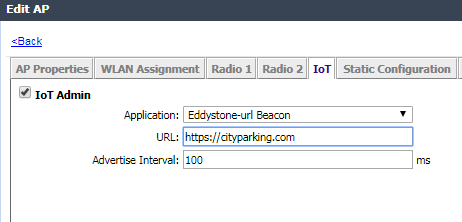
IoT Eddystone-url Beacon Application Settings
| Field | Description |
|---|---|
| Application | Determines application type. Select Eddystone-url Beacon |
| URL | The URL that is included with the Eddystone-url beacon. The URL is limited to 17 characters. The 17 characters does not include the protocol, but it does include the domain name. A secure protocol (HTTPS address) is required. The URL is compressed, effectively allowing more than a 17-character input. See https://github.com/google/eddystone/tree/master/eddystone-url for the Eddystone-url compression rules to more accurately judge the length of your URL. If necessary, also find third-party URL Shortening Services available on the internet. |
| Advertise Interval | The advertising interval for the beacon application. Valid values are: Min (100ms) and Max (10240ms). The default value is Min (100ms). |
 Print
this page
Print
this page Email this topic
 Feedback
 View PDF
 Download EPUB