
With the iBeacon application, configure a supported AP as an iBeacon in an IoT network. The following APs offer integrated BLE/802.15.4 radios: AP3912i , AP3915i/e, AP3916ic, AP3917i/e/k.
To configure iBeacon support from the IoT tab:

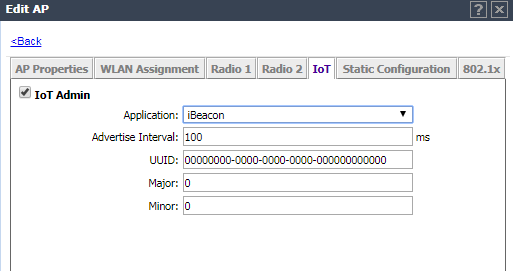
IoT iBeacon Application Settings
| Field | Description |
|---|---|
| Application | Determines application type. Select iBeacon |
| Advertise Interval | The advertising interval for the beacon application. Valid values are: Min (100ms) and Max (10240ms). The default value is Min (100ms). |
| UUID | Identifier used to differentiate a large group of related beacons. A company can have a network of beacons with the same UUID. |
| Major | Identifies a subset of beacons within the larger set. This value could represent a venue specific attribute, such as a specific store or wing in a building. Valid values are 0 to 65635. |
| Minor | Identifies an individual beacon. Used to more precisely pinpoint beacon location. This value complements the UUID and Major values to provide more granular identification of a specific location, such as a particular shelf, door-way, or item. Valid values are 0 to 65635. |
 Print
this page
Print
this page Email this topic
 Feedback
 View PDF
 Download EPUB