 Assigning WLAN Services to AP3912 Ports
When configuring the AP3912, you can assign one
or more client ports to a single WLAN service, but the port can only be assigned to
one service. Wired ports can only be assigned to open WLAN services. There is no
security or privacy on the client ports.
-
From the top menu, click AP.
-
Select an AP3912.
The AP Properties dialog
appears.
-
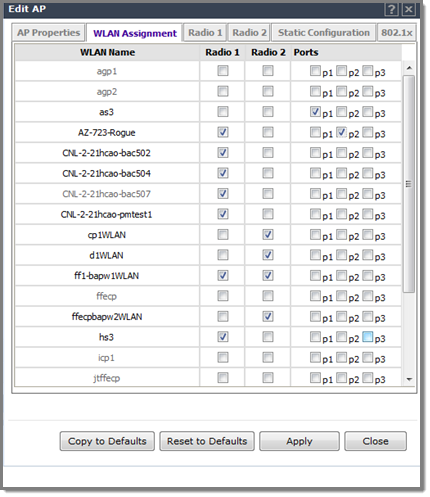
Select the WLAN Assignment tab.
-
Select
one or more client ports for each WLAN Service.
- A WLAN service can have one or more port
assignments, but a client port can be assigned to only one WLAN
service.
- If the port does not have a WLAN service assignment,
the port is disabled.
- One policy definition for wired and wireless users. Users
on wired ports receive the same default policy.
- Wired ports can only be assigned to open WLAN
services. There is no security or privacy on the client ports.
Assigning Ports to WLANS on the AP3912
-
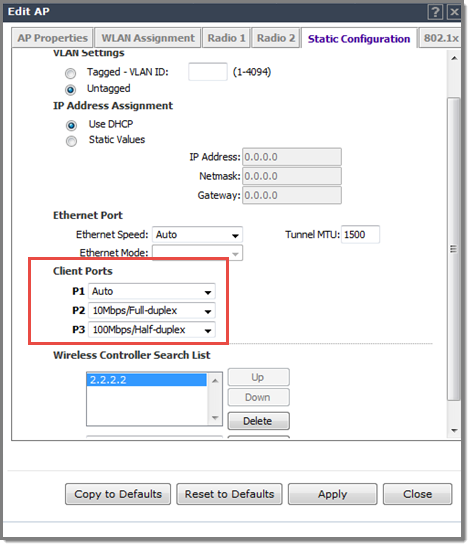
To configure wired ports, select the Static Configuration tab and
select the speed and mode settings for the Ethernet port and each client port.
Configure the values that the client hardware supports. The Auto setting uses
the supported values for the connected hardware in bytes per second.
Port Configuration for Wired Ports


 Print
this page
Print
this page Email this topic
 Feedback
 View PDF
 Download EPUB